PDF to Fax Service Guide: Compare Top Options
At 9:47 p.m., a freelancer finishes a signed PDF and discovers that the client still requires a fax before the morning deadline. There's no fax machine, no spare phone line, and no time to drive to a print shop. A browser-based PDF to fax service turns that problem into a short online transaction, but choosing the right service still requires more than checking whether it has an upload button.
The decision is simple: pay per fax for occasional work, or subscribe when recurring volume, compliance, and team controls justify a monthly commitment. This guide compares those options, explains what happens to your PDF after upload, and focuses on the operational details that cause failures, including delivery confirmation, page limits, malformed files, cover-page control, HIPAA safeguards, and Business Associate Agreements.
Why Browser-Based PDF to Fax Services Now Replace the Fax Machine
The freelancer in that late-night example doesn't need fax hardware. They need a reliable way to move a signed document from a laptop to a recipient's fax number. A browser-based service removes the physical machine, dedicated line, paper, toner, and office location from the workflow.
That shift matters because fax hasn't disappeared from regulated business processes. An ACM summary of industry reporting says the United States exchanged more than 9 billion fax pages in 2019, while the country handled more than 17 billion faxed documents that year overall. Healthcare organizations accounted for a disproportionately large share of that traffic, which helps explain why referrals, records, forms, and authorizations still arrive through fax channels (ACM summary of fax usage).
The practical result is a bridge between modern document creation and legacy document intake. A clinic may accept a PDF by fax even when its systems don't exchange records cleanly with an outside provider. A law office may need a transmission receipt for a filing. A freelancer may have no reason to maintain a fax number but still encounter a client that insists on one.
The cost of keeping a machine
A physical fax setup creates fixed overhead before anyone sends a page. The office needs compatible hardware, a working line, supplies, maintenance, and someone who notices when a transmission fails. It also ties the workflow to one room, which is a poor fit for remote staff, traveling agents, and small teams.
Online faxing changes that cost structure. The sender uploads a digital file, enters the destination, and receives a status update through the browser or email. The recipient can still use a conventional fax machine, while the sender avoids recreating the old infrastructure.
Practical rule: If you fax only when a customer, insurer, court, or government office demands it, start by pricing individual transmissions. A recurring subscription should solve a recurring operational problem, not merely provide peace of mind.
The broader market reflects this migration. One estimate values the global online fax service market at USD 1,718.6 million in 2026 and projects USD 9,537.6 million by 2035, with an 18.5% CAGR (online fax market estimates). Another estimate places the global online fax market at USD 4.70 billion in 2022 and forecasts USD 12.32 billion by 2030, showing that cloud faxing has become a substantial document-delivery category rather than a novelty.
What Happens When You Upload a PDF to an Online Fax Service
A browser-based fax service acts as a conversion and delivery pipeline. Your PDF starts as a structured digital document, but the receiving fax infrastructure expects fax-native image data. The provider handles the translation, routing, retry logic, and status reporting.
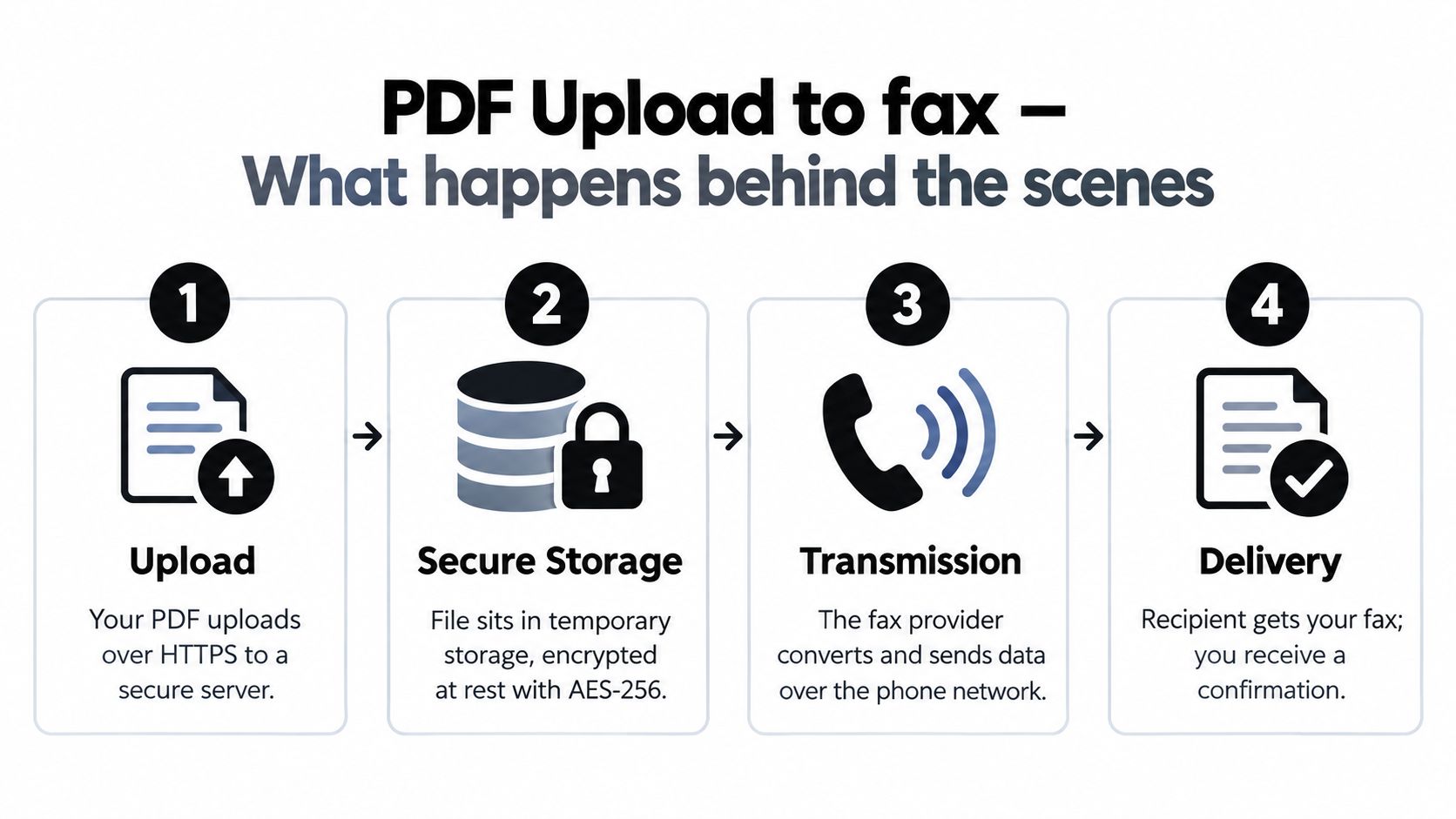
The four operational stages
Upload and validation. You choose the PDF in a web form and provide the destination fax number. The service checks whether the file is readable and whether it meets its format and size rules. A password-protected PDF, damaged file, unsupported PDF version, or oversized transmission can fail before the provider attempts a call.
Temporary processing. The uploaded document is held while the service prepares it for transmission. Security depends on the provider's handling of access, encryption, retention, and deletion. Don't assume that a file disappears immediately just because you used a browser.
Rasterization. The provider commonly converts every page into TIFF, a format designed for fax transmission. A fax service source identifies 200 dpi as standard mode and 400 dpi as fine mode, so the conversion normalizes page dimensions, resolution, and image data before sending (fax conversion and transmission details).
Transmission and confirmation. The prepared pages travel through the provider's telephony network to the recipient's fax endpoint. Higher-quality internet-to-fax systems use T.38, the ITU standard for fax over IP, because it handles packet loss better than plain audio bridging. Afterward, the service should show whether the transmission was queued, attempted, completed, or rejected.
A valid PDF still needs operational review. Check that signatures, small print, tables, and scanned pages remain legible. If the document contains color, expect the fax process to translate it into fax-compatible image data rather than preserve the original visual experience.
For a practical upload walkthrough, see this guide to sending a PDF by fax. Treat the delivery report as part of the record, especially when the fax supports a deadline, authorization, or regulated exchange.
Comparing PDF to Fax Services on the Criteria That Actually Matter
Feature checklists hide the decision. A solo professional doesn't evaluate faxing like a hospital system, and a clinic shouldn't select a consumer tool solely because it has a low entry price. Compare the workflow against volume, document sensitivity, recipient expectations, and the evidence you need after transmission.
| Criterion | SendItFax (Pay-Per-Use) | Mid-Tier Subscription | Enterprise / API Platform |
|---|---|---|---|
| Pricing model | Pay for individual sends | Recurring monthly fee with included usage | Contracted or account-based pricing |
| Best fit | Occasional PDFs and one-off jobs | Steady business volume | High-volume, integrated team workflows |
| Page economics | Strong when use is sporadic | Better when included allowance is consistently used | Designed for scale and predictable throughput |
| Delivery confirmation | Must be checked before sending | Usually included in the portal or email workflow | Typically includes centralized reporting and administrative visibility |
| Fax number | Useful for sending without maintaining hardware | Often includes dedicated numbers | Supports managed numbers, routing, and organizational ownership |
| File handling | Confirm PDF limits and conversion behavior | Usually supports common business formats | Often supports broader integrations and programmatic submission |
| Compliance posture | Verify BAA, retention, access, and audit features directly | Select a plan with documented safeguards | Best suited to formal security review, SSO, audit controls, and integration requirements |
| Workflow control | Browser-first and simple | Shared accounts or team features vary | APIs, EHR or case-management integrations, policy controls |
| Main risk | Paying more per send at repeated volume | Paying for unused allowance | Overbuying complexity and implementation effort |
Cost per page isn't the only cost
For occasional faxing, the subscription fee is the first waste to eliminate. If a freelancer sends one signed contract or a nonprofit submits a form sporadically, a pay-per-use service avoids paying during inactive months. The calculation changes when a team sends documents every week and can reliably consume the plan's included pages.
Page limits deserve equal attention. Legal exhibits, medical records, and application packets can exceed the allowance of a basic send. Ask whether the service accepts multiple attachments, whether it counts the cover page, and what happens when the file exceeds the maximum. A cheap transmission that stops at a limit isn't cheap operationally.
Delivery proof and file integrity
A successful upload isn't proof that the recipient received a complete fax. Look for a timestamped status, pages transmitted, recipient number, failure reason, and retry behavior. Independent testing described in a 2026 industry review reported that top-performing services achieved sub-850 ms end-to-end delivery latency across 1,280 real-world transmissions, while also passing TLS 1.3 consistency checks and FIPS 140-2 validated encryption key-management tests (industry fax service review). Those findings are useful as a benchmark for evaluating vendors, but buyers should still request current service documentation rather than rely on a review alone.
Ask for a test transmission before committing. Use a PDF with a signature, fine print, a table, and a scanned page. Confirm that the received fax is readable and that the report identifies the correct destination.
Compliance and Privacy for Sensitive PDF Fax Workflows
A service can successfully fax a PDF and still be unsuitable for regulated information. Transmission capability is not the same as compliance readiness. Healthcare organizations must consider PHI, legal teams must protect privileged material, and real estate professionals must control signed contracts and financial instructions.
For healthcare, independent compliance guidance says faxing PHI is permitted under HIPAA when the organization uses reasonable safeguards. A cloud provider handling ePHI must address Security Rule expectations, including access controls, audit controls, integrity controls, and transmission security (HIPAA guidance for faxing PDFs).
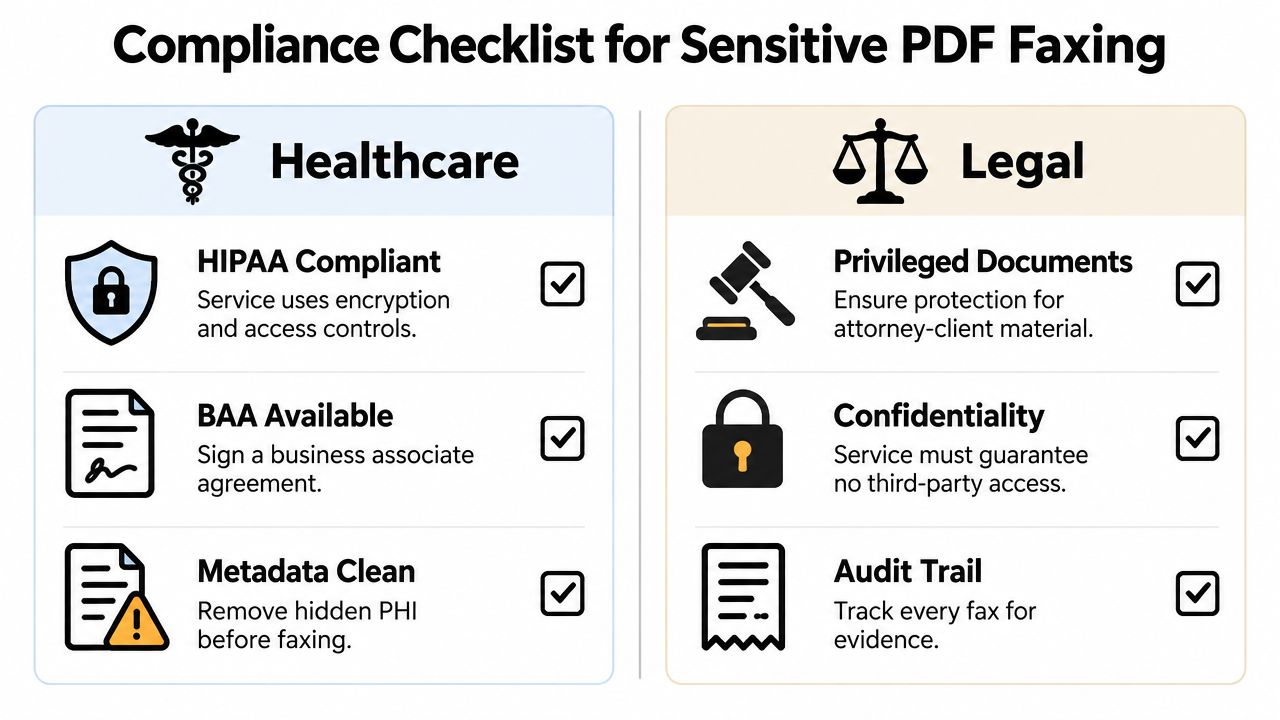
What a healthcare buyer should verify
A medical office shouldn't enable a generic free workflow for PHI and call the job complete. Ask the vendor for a Business Associate Agreement, then confirm what services and processing activities the agreement covers. The BAA should align with the actual account, plan, subprocessors, storage locations, and support arrangements.
Use this checklist during vendor review:
- Encryption in transit and at rest: Confirm how the provider protects the file during upload, processing, storage, and delivery.
- Access controls: Require unique users, appropriate permissions, and administrative control over who can send or view documents.
- Audit records: Verify that the system records sender, recipient, timestamps, status changes, and relevant administrative actions.
- Retention and deletion: Ask how long the PDF, rendered TIFF, transmission metadata, and delivery report remain available.
- Subprocessors: Request the current list and understand which parties handle storage, conversion, messaging, or telecommunications.
- Incident response: Ask how the provider notifies customers about breaches and preserves relevant logs.
- Metadata handling: Remove unnecessary PHI from filenames, document properties, comments, and hidden layers before upload.
Legal and real estate teams need similar discipline, even when HIPAA doesn't apply. Privileged documents should have restricted access, controlled retention, and a defensible record of delivery. For broader context on safeguarding sensitive information, consult this US data privacy security shield.
A service's security claims need to match its contract and configuration. Review the provider's fax security guidance before sending confidential documents, and don't treat a padlock icon in the browser as evidence that the entire workflow satisfies your obligations.
Sending a PDF Through SendItFax Step by Step
For a single U.S. or Canadian fax, the workflow should stay uncomplicated. SendItFax accepts PDF files through its web form, with optional sender details and a cover-page message. The free option supports up to three pages plus a cover, while the Almost Free option costs $1.99 per fax, supports up to 25 pages, provides priority delivery, and removes SendItFax branding from the cover page, according to the publisher's stated product information.
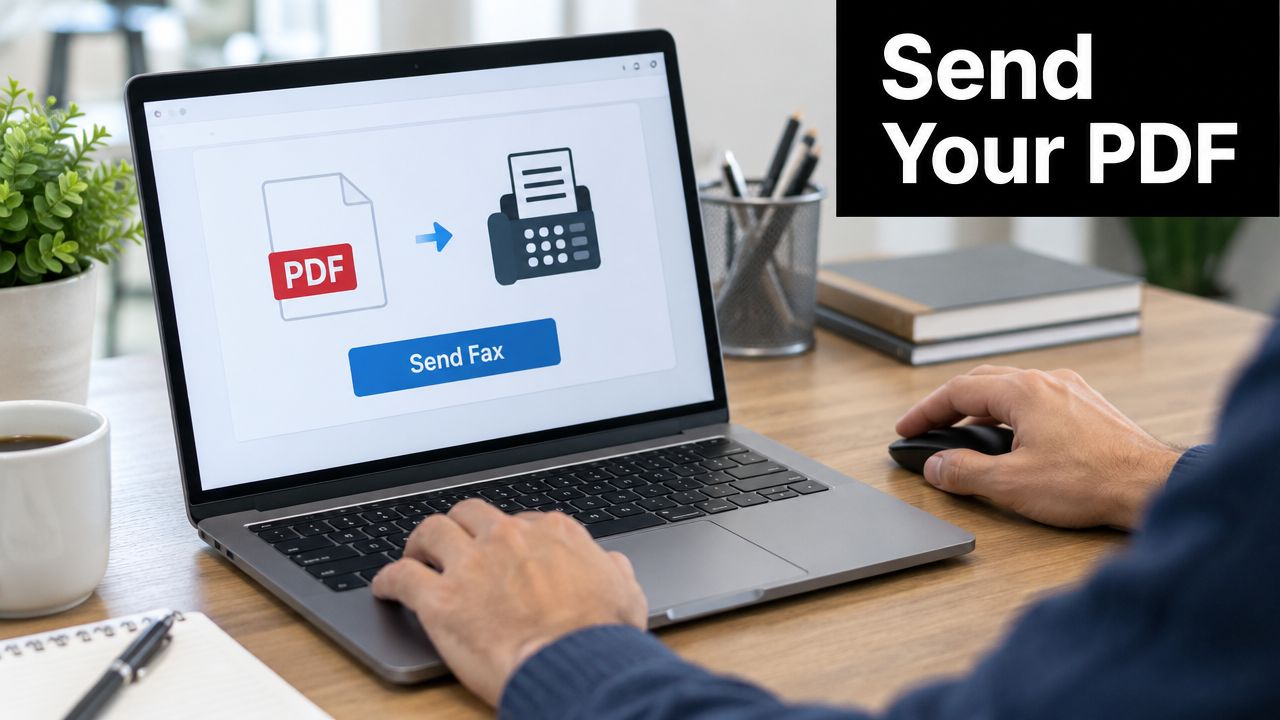
Use this sequence for a clean send
Open the send form. Start at the SendItFax send page and select the option to send a fax. Browser-based access is useful when you're working from a laptop, phone, or shared office workstation.
Enter the destination carefully. Provide the recipient's fax number in the required format, including the country code where requested. Recheck every digit. Fax transmissions generally can't be recalled after dialing.
Add sender information. Enter your name and any requested organization or callback details. The recipient needs enough context to identify the transmission and contact you if pages are unclear.
Choose the cover-page treatment. Add a subject and message when the recipient needs context. For a professional document, select the cleaner paid option if branding would look out of place, or omit the cover page when the receiving workflow already identifies the sender.
Upload and inspect the PDF. Use a standard, valid PDF. Review the preview or first rendered page for cut-off text, missing signatures, blank pages, and unreadable scans. A PDF that opens on your laptop can still contain rendering problems during fax conversion.
Select the delivery option. Use the free option for a low-stakes, short transmission when its limits and branding are acceptable. Choose Almost Free when page count, presentation, or queue priority matters.
The status should progress through queueing, dialing, transmission, and a final success or failure state. Save the confirmation, and retry only after checking whether the first attempt completed. The web fax sending workflow provides additional context for browser-based transmission.
A short demonstration can help new staff understand the sequence before they handle a deadline-sensitive document.
SendItFax is appropriate for quick, occasional delivery where the recipient is in the United States or Canada and the document fits the selected option. For PHI, privileged material, or documents subject to retention rules, complete the vendor review first. The convenience of an upload form doesn't remove the sender's responsibility to use a suitable workflow.
Choosing the Right PDF to Fax Service for Your Situation
The right service depends on the person responsible for the send, not on the industry label alone. A freelancer, dental office, paralegal, and real estate agent may all upload PDFs, but their tolerance for recurring fees, shared access, and audit requirements differs sharply.
| User Persona | Monthly Fax Volume | Recommended Service Type | Must-Have Features | Watch For |
|---|---|---|---|---|
| Solo freelancer | Occasional | Pay-per-use | Clear delivery confirmation, simple PDF upload, optional cover page | Subscription fees during inactive months |
| Small dental clinic | Steady daily workflow | Compliance-ready subscription | BAA, access controls, audit logs, retention controls, dedicated number | Sending PHI through a consumer workflow |
| Real estate agent | Time-sensitive, variable | Subscription with workflow priority | Delivery alerts, clean cover pages, mobile access, email-to-fax, reliable retry handling | No status visibility or unclear file limits |
| Remote paralegal | Team and matter based | Enterprise or API platform | SSO, centralized billing, audit trails, permissions, integrations | Shared credentials and scattered receipts |
| Nonprofit | Sporadic | Pay-per-use | Low commitment, cover-page customization, predictable limits | Branding or page caps that undermine formal submissions |
Five practical recommendations
The freelancer should begin with pay-per-use. One signed agreement a month doesn't justify a dedicated number, centralized administration, or a standing monthly charge. The moment the freelancer starts sending recurring client packets, they should compare total monthly usage against a subscription allowance.
The dental clinic needs a compliance-ready plan, not the cheapest upload form. The clinic should obtain a BAA, restrict access, document delivery, and establish a retention policy before sending referrals or records. If staff members share one login, the workflow is already difficult to audit.
Estate agent values speed and presentation. Offers and wire instructions need accurate destination entry, clear sender identification, delivery alerts, and a cover page that doesn't create confusion. A subscription becomes sensible when the agent sends enough time-sensitive documents that manual tracking becomes a daily task.
The remote paralegal needs centralized control. An enterprise or API platform is justified when multiple people work across matters and administrators need SSO, permissions, billing, and exportable audit history. A browser form remains useful for isolated work, but it isn't a substitute for matter-level governance.
The nonprofit should avoid paying for dormant capacity. A pay-per-use service with a customizable cover page works when grant and administrative submissions arrive irregularly. Upgrade when several people send faxes, recipients demand consistent branding, or the organization needs a shared archive.
Quick Decision Guide for Picking Your Best PDF to Fax Option
Use this decision matrix before choosing a plan. Start with document sensitivity, then consider frequency, then assess whether other people need access to the workflow.
| Situation | Free Pay-Per-Use | SendItFax Almost Free | Subscription / Enterprise |
|---|---|---|---|
| One-off signature or test page | Suitable if the page limit and branding work | Useful when presentation or priority matters | Unnecessary unless use becomes recurring |
| Occasional business PDF | Suitable for short, low-risk sends | Strong fit for a cleaner, longer transmission | Consider only after consistent usage develops |
| PHI or regulated healthcare records | Don't use without verified compliance controls | Don't assume suitability without a BAA and documented safeguards | Choose a plan with the required compliance posture |
| Attorney-client material | Only after security and retention review | Only after security and retention review | Prefer managed access and audit controls |
| Dedicated fax number needed | Usually not the right tier | Usually not the right tier | Appropriate for persistent receiving and team workflows |
| Repeated monthly sending | Costs and limits may become restrictive | May work for modest activity | Better when volume and collaboration are steady |
| EHR, case-management, or API integration | Not designed for this | Not designed for this | The practical choice |
The free tier is enough when the fax is short, infrequent, low risk, and the recipient accepts its cover-page treatment. Almost Free is the sensible middle ground when you need a longer document, cleaner presentation, or priority handling without committing to a subscription.
A subscription or enterprise platform becomes necessary when you need a dedicated number, recurring receiving, team permissions, SSO, audit trails, API access, or an executed BAA. Market reporting also identifies mobile faxing and digital-platform integration as major trends, with one 2026 report stating that roughly 55% use mobile faxing and 61% integrate with digital platforms (online fax market trends). Those figures reinforce a practical point: once faxing becomes part of a broader system, a basic upload form may no longer be enough.
Ask yourself three questions:
- How often will we send or receive faxes over the next few months?
- Does any document contain PHI, privileged content, or commercially sensitive instructions?
- Do we need individual access, audit evidence, a dedicated number, or system integration?
Your answers should determine the tier. Don't buy a subscription to solve a one-off problem, and don't use a casual browser workflow for documents that require formal safeguards.
SendItFax offers browser-based PDF faxing to U.S. and Canadian recipients, with a free option for short transmissions and an Almost Free option for longer, cleaner, priority delivery. If your need is occasional and you want to avoid fax hardware or a recurring plan, visit SendItFax and choose the option that matches your document length and workflow requirements.
Related Posts
7 Free Fax Number Options: Limits, Trials, and Privacy
Fake Fax Numbers Explained Risks and Safe Alternatives