How to Send Fax Via Internet A Modern Real-World Guide
Sending a fax over the internet is actually pretty simple. You just use an online fax service, upload your document, punch in the recipient's fax number, and hit send. That’s it. Your computer or smartphone effectively becomes a fax machine, without any of the bulky hardware or the need for a separate phone line.
Why Internet Faxing Is Still Essential Today
I know what you're thinking—faxing? In this day and age? It might sound like a technology from a bygone era, but it’s still a crucial tool in many industries. Before we get into the nuts and bolts of sending a fax online, it’s worth understanding why this technology hasn’t just survived, but is actually thriving. It’s not about nostalgia; it’s all about security, legal validity, and pure reliability.
In sectors like healthcare, law, and government, the ability to send documents securely and get a verifiable receipt is non-negotiable. Regular email is great for a lot of things, but it often falls short on the robust security and legal weight needed for truly sensitive information. This is exactly where internet faxing comes in.
The Modern Case for Faxing
Online faxing creates a secure, encrypted pipeline for your documents. Think about it: a traditional fax machine often sits out in the open for anyone to see. A digital fax, on the other hand, lands directly in a secure online portal or a designated email inbox. This keeps things confidential and helps businesses tick all the compliance boxes for regulations like HIPAA.
Here’s why it’s still so relevant:
- Legal Admissibility: Faxes often hold more legal weight than emails. That transmission receipt you get is solid proof of delivery, which is a big deal for contracts, legal notices, and other official records.
- Enhanced Security: Good online fax services use strong encryption to protect your data while it's in transit. This makes it a much safer bet for sending confidential patient files, financial statements, or sensitive legal agreements.
- Universal Compatibility: This is a huge one. You can send a document from your brand-new laptop directly to a 20-year-old fax machine in a government clerk's office, and it just works. It perfectly bridges the gap between the digital and analog worlds.
The global online fax market isn't just hanging on—it's growing. This shows a clear shift away from clunky physical machines toward more agile, internet-based solutions that fit how modern businesses operate.
The numbers back this up. In 2024, the online fax services market was valued at around USD 2.52 billion. It's projected to hit USD 4.54 billion by 2033, which points to some serious, steady growth. You can see more details on this trend over at Business Research Insights.
Of course, knowing your destination is key. You'll need to understand https://blog.senditfax.com/2025/11/12/what-is-a-fax-number/ and how to format it correctly to make sure your document arrives safely. This modern twist on a classic technology is exactly why figuring out how to send a fax via the internet is such a valuable skill for any professional to have today.
Choosing the Right Method to Send Faxes Online
So, you need to send a fax over the internet, but which way is best? It's not a one-size-fits-all answer. The right choice really comes down to what you're doing—how often you're sending faxes, what kind of documents you're dealing with, and whether you need detailed records.
Let's cut through the noise and look at the most common ways people handle this. For most folks, it boils down to using a dedicated online service or a handy email-to-fax feature.
Dedicated Online Fax Services
Think of a dedicated online fax service, like SendItFax, as your digital faxing headquarters. It gives you a web portal where you can do everything: upload your files, manage contacts, whip up a professional cover page, and see a full history of everything you've sent. This is the go-to option if you send faxes regularly or just want more control over the process.
It’s especially valuable for businesses that need a solid paper trail. You can see exactly when a fax was sent, get a confirmation of successful delivery, and pull up old transmissions in seconds. That kind of organization is gold, particularly in fields like law or healthcare where records are everything.
The real power of a dedicated service lies in its comprehensive feature set. You get robust tools for managing documents, ensuring compliance, and maintaining a professional appearance—all from a simple, intuitive web interface.
The Speed and Simplicity of Email-to-Fax
What if you just need to send a single document and be done with it? For those one-off situations, email-to-fax is a lifesaver. Many online fax providers let you send a fax straight from your email client—no need to log into another website.
It couldn't be simpler. You just compose a new email, attach your document (like a PDF or Word file), and type the recipient’s fax number into the "To" field, followed by the service’s special domain (for example, [email protected]). The body of your email automatically becomes the text on the cover page. It’s perfect for sending something quickly on the fly.
Integrating Existing Hardware
Some offices still rely on their trusty multifunction printer, and that's perfectly fine. If you want to connect your physical machine to the world of internet faxing, an Analog Telephone Adapter (ATA) is the piece of hardware you're looking for.
This little box plugs your fax machine into your internet router. It essentially tricks the machine into thinking it's using a phone line when it's really sending faxes over your network. It’s a smart move for businesses that have already invested in good hardware but want to ditch the expense and hassle of a dedicated landline.
Comparing Internet Faxing Methods
To make the decision a bit easier, here’s a quick-glance comparison to help you choose the best method for your faxing needs based on common user scenarios.
| Method | Best For | Ease of Use | Typical Cost |
|---|---|---|---|
| Online Fax Service | Regular business use, record-keeping, and security | Very Easy | Monthly subscription |
| Email-to-Fax | Occasional, quick faxes from any device | Easiest | Pay-per-fax or free |
| Multifunction Adapter | Offices integrating existing hardware | Moderate | One-time ATA cost |
At the end of the day, it’s all about what fits your workflow. A dedicated service is your best bet if you value features and a clear audit trail. For sheer convenience, email-to-fax can't be beaten.
If you're ready to dig deeper and see how different providers stack up, check out our comprehensive online fax services comparison for a full breakdown.
Sending Your First Fax With an Online Service
Diving into online faxing is way easier than it sounds. If you’re used to dealing with paper jams, busy signals, and that screeching modem sound, you’re in for a pleasant surprise. Using a web-based service feels a lot like sending an email, but it comes with the security and legal standing that faxes still command in many industries.
Let's walk through how it actually works.
Most online platforms are built to be dead simple. You'll usually pick a plan—many services, including our own free option here at SendItFax, let you send a few pages without pulling out your credit card. This is perfect if you just need to send a one-off signed contract or a medical form.
Once you’re in the portal, the interface pretty much holds your hand the whole way. But the first real decision is figuring out which method fits how you work.
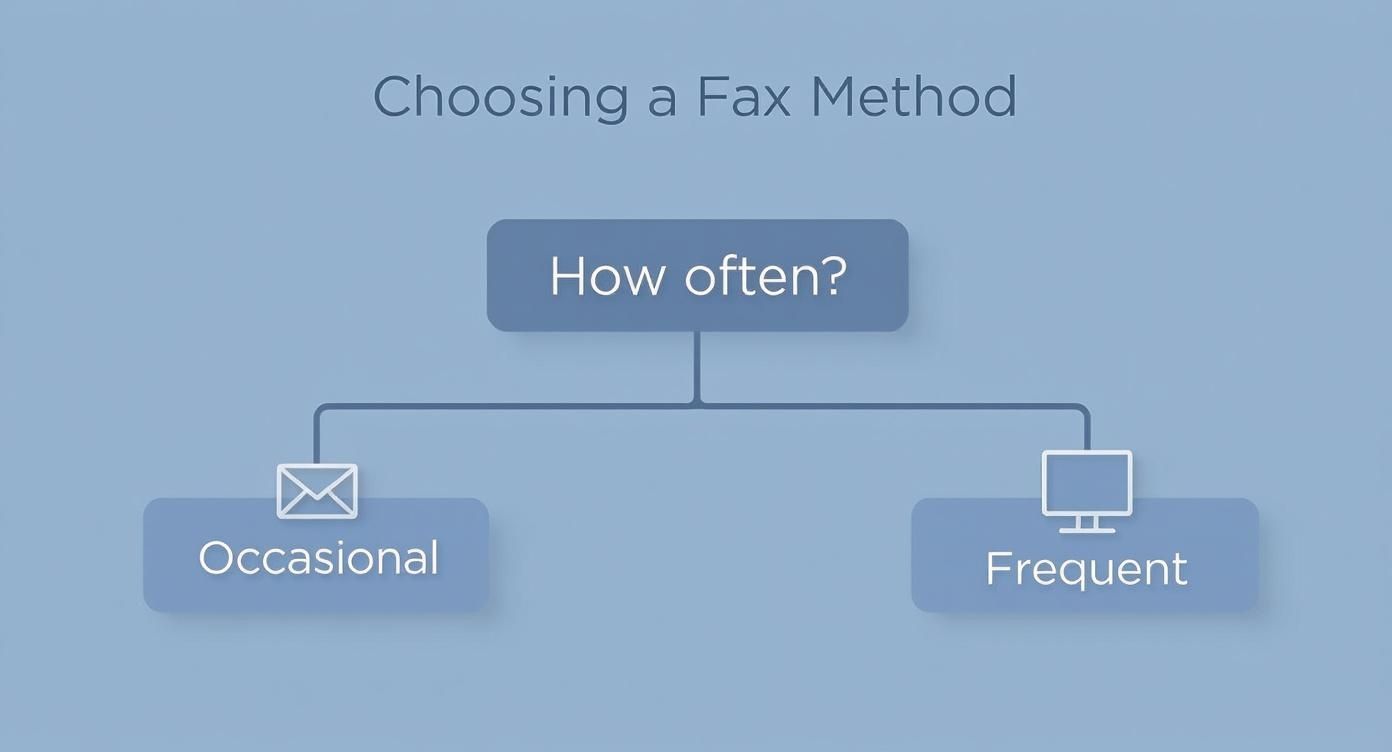
As you can see, it really boils down to frequency. If you're sending faxes sporadically, something quick and easy like an email-to-fax feature is fantastic. For regular business communications, the robust tools and tracking of a dedicated online portal make more sense.
Preparing and Uploading Your Files
First, you need your document. The great thing about online faxing is the flexibility—you’re not stuck with a single file type.
- PDFs: This is the undisputed champion for faxing. A PDF locks in all your formatting, so what you see on your screen is precisely what prints out on the other end. No surprises.
- Word Documents (.doc, .docx): Perfect for letters, reports, or any text-heavy document. The service handles the conversion to a fax-friendly format for you.
- Image Files (.jpg, .png): Got a signed paper you scanned with your phone? Or maybe a diagram? Image files work great, just make sure the text is sharp and easy to read.
Once your file is ready, you just upload it to the web portal. It's the same drag-and-drop or "browse" motion you use for email attachments.
My Pro Tip: If the service has a document preview feature, always use it. A quick 5-second glance can save you the headache of realizing you sent a document with weird formatting or a missing page.
Filling Out the Cover Sheet and Recipient Details
Think of the cover sheet as your professional handshake. It immediately tells the person on the other end who you are, who the fax is for, and what it’s about. Nearly every online service has a simple form to fill this out.
You'll plug in the basics: sender and recipient names and their phone numbers. The subject line and comments sections are where you can add critical context, like "Signed Purchase Order #5021" or "Urgent: Patient Referral Information."
I can't stress this enough: the #1 reason faxes fail is a mistyped number. A single wrong digit and your document is lost in the ether. Double-check it. Then check it again.
And don't forget international codes! Sending a fax to the UK? You'll need to start with +44. For faxes inside the US and Canada, just the standard area code and 7-digit number will do the trick.
Finalizing and Sending Your Fax
Okay, you've uploaded your document, filled in the cover sheet details, and triple-checked the recipient's fax number. You're ready.
Just hit that "Send" button.
The service takes it from there. It dials the number, negotiates the connection with the receiving machine, and transmits your file. You don't have to do a thing.
Within minutes, an email should land in your inbox—your confirmation receipt. This is your proof of transmission, usually detailing the delivery time and page count. Hang onto this email! It’s the modern-day version of that little printed confirmation slip from an old-school fax machine.
Sending a Fax Right From Your Email
Believe it or not, you can send a fax without leaving your email inbox. This method, often called email-to-fax, is one of the most efficient ways to get documents where they need to go. It turns a tool you already use every day into a surprisingly powerful fax machine.
This approach is a lifesaver for anyone who needs to move fast. Instead of fussing with a web portal or a dedicated app, you just compose a new email, attach your file, and hit send. It's the ultimate "send it and forget it" solution for modern professionals.
The Magic Is in the "To" Field
So, how does it work? The whole process hinges on a specially formatted email address. You’re not sending the file to a person’s normal email; you’re sending it to an address that tells the fax service which machine to dial.
The format is almost always the same, no matter which online fax service you use: [FaxNumber]@[FaxServiceDomain.com].
Let's say you're sending a document to the fax number 1-800-555-1234 using a provider like SendItFax. The address you'd type into the "To" field is simply [email protected].
Notice it's just the numbers—no dashes, parentheses, or spaces. The service instantly recognizes that string of numbers, converts your attached file, and dials the fax line for you.
I find this method invaluable when I'm on my phone and need to send a signed contract back to the office immediately. I just snap a picture, attach it to an email, and send it off in under a minute. No extra apps, no logging in.
A Few Quick Tips for a Perfect Send
To make sure your fax arrives looking clean and professional, a little prep work goes a long way. The quality of your transmission really comes down to the file you attach and how you set up the email itself.
Here are a few pointers I've learned from experience:
- Stick with PDFs: While most services support common formats like DOCX, JPG, or PNG, PDFs are the gold standard. They lock in your formatting, so what you see on your screen is exactly what the recipient gets.
- The Subject Line is Your Cover Note: Whatever you put in the email's subject line becomes the "Subject" or "RE:" line on the fax cover page. Something clear and direct, like "Signed Agreement for Project Phoenix," works best.
- The Email Body is Your Message: Any text in the body of your email populates the comments section of the cover sheet. This is the perfect spot for a quick note or instructions for the recipient.
Once you click send, the service takes over completely, handling the conversion and dialing behind the scenes. The best part is the confirmation receipt that lands right back in your inbox, giving you a clear paper trail. This email typically confirms the delivery time and the number of pages sent, closing the loop with zero extra effort.
Keeping Your Faxes Secure and Compliant in the Digital Age
When you’re faxing something online, chances are it contains sensitive information. Think about it—legal contracts, patient medical records, financial statements. In these cases, security isn't just a nice-to-have feature; it’s the whole point.
This is where digital faxing has a massive advantage over old-school machines. A traditional fax lands on a tray in a shared office space, where anyone can walk by and see it. An online fax, on the other hand, arrives safely in a password-protected inbox. That simple difference alone is a huge leap forward for privacy.
How Encryption Keeps Your Documents Safe
The real magic happens behind the scenes. Any reputable online fax service uses powerful encryption protocols, like Transport Layer Security (TLS), to shield your documents as they travel across the internet.
It's like putting your document in a sealed, tamper-proof envelope before it ever leaves your computer. Even if someone managed to intercept the data in transit, all they’d see is scrambled, unreadable code. This makes online faxing far more secure than sending information over an unencrypted analog phone line.
Hitting Tough Compliance Targets
For many industries, especially healthcare and finance, following strict data privacy rules is a legal must. This is where you really need to be careful about which online fax provider you choose. Professional-grade services are built from the ground up to meet the technical demands of major regulations.
Look for a service that can help you stay compliant with frameworks like:
- HIPAA (Health Insurance Portability and Accountability Act): Absolutely critical for anyone in healthcare to ensure patient data stays private.
- GDPR (General Data Protection Regulation): The standard for protecting the data of individuals in the European Union.
A compliant service gives you the tools you need to meet these obligations, such as secure cloud storage for your faxes and detailed audit trails to track every transmission.
When you're picking a provider, you have to dig into their security practices. Not all services are created equal, and it's worth asking questions like "is FaxZero safe?" before trusting them with your documents.
At the end of the day, using a secure online fax service is all about peace of mind. It gives you the confidence that your most sensitive documents are protected from the moment you hit "send" until they land securely on the other side.
Got Questions About Sending Faxes Online?
Even with the best instructions, a few questions always pop up when you're sending a fax online for the first time. Let's walk through some of the most common ones I hear, so you can send your documents without a second thought.
People often ask, "Do I really need a phone line for this?" The answer is a hard no. That’s the whole point of online faxing! These services use your internet connection to do all the heavy lifting, completely cutting out the need for a physical phone line. It’s a huge plus, saving you from paying for a landline you’d probably never use for anything else.
What Kind of Files Can I Actually Send?
Another common question is about file types. The good news is, you've got a ton of flexibility here. You're not stuck printing everything out just to scan it back in.
Most online fax services are built to handle the files you already use every day:
- PDF (.pdf): This is always my top recommendation. It locks in your formatting, so what you see on your screen is exactly what they'll get on their end.
- Microsoft Word (.doc, .docx): Perfect for sending off a contract or report straight from your computer. No conversion needed.
- Image Files (.jpg, .png, .gif): Got a signed form, a photo, or a quick diagram? You can send those directly as well.
Basically, if you can attach it to an email, you can almost certainly fax it online. The service takes care of converting it into a fax-friendly format behind the scenes.
Is This Internet Faxing Thing Secure?
It’s smart to ask about security, especially if you're sending sensitive documents. Honestly, a reputable online fax service is worlds more secure than an old-school fax machine. Think about it: a traditional fax often spits out paper onto a tray in a busy office, where anyone can see it. A digital fax lands in a secure, password-protected online account or a private email inbox.
Your documents are protected with serious encryption—like TLS—while they're in transit. This scrambles the data, making it completely unreadable to anyone trying to snoop. It's a level of security that an analog phone line just can't provide.
And here’s something else to consider: the environmental benefit. If just 5% of fax users switched from paper to online, it's estimated we could save 10 billion pages of paper a year. That’s about 1 million trees! Switching to virtual faxing isn't just about making your life easier; it’s a greener way to do business. You can read more about these online fax statistics on LLCBuddy.com. It's all part of a bigger shift toward more efficient and sustainable practices.
Ready to send a fax the modern way? With SendItFax, you can send your documents online in seconds—no account or subscription needed. Try it now for free at SendItFax.com.
Related Posts
Cheap Faxing Services Near Me? In-Store vs. Online Costs
7 Confidential Statement Example Templates for 2026