Create the Perfect Fax Cover Sheet Template
A cover sheet template is more than just a piece of paper you stick on top of a fax. Think of it as the gatekeeper for your important documents. It’s the first thing your recipient sees, and it’s what ensures your sensitive information gets to the right person, right away, and without any confusion.
Using a well-designed template is a small step that pays huge dividends in time saved, errors avoided, and a consistently professional look for your business.
Why You Still Need a Good Cover Sheet
Let's be honest, in a world of instant messages and endless email chains, faxing can feel a bit old-school. But for industries where security and legal validity are non-negotiable—like healthcare, law, and real estate—faxing is still the gold standard. A professionally crafted cover sheet isn't just a courtesy; it's a critical part of the process.
Think of it as your first line of defense against misdelivery. When you clearly spell out the recipient's name, the sender's details, and the total page count, you dramatically lower the risk of that critical contract or patient file landing on the wrong desk in a busy office.
The Foundation of Professional Communication
Imagine a legal contract or a patient’s medical records just showing up on a fax machine with no context. Who sent it? Who is it for? Is it urgent? A cover sheet answers all these questions at a glance. It sets a professional tone from the very beginning and shows the other party that you’re organized and thorough.
This simple document is a quiet workhorse for your brand. Its benefits are straightforward but powerful:
- Saves Time and Keeps Things Consistent: A reusable template means you're not starting from scratch every single time.
- Prevents Critical Errors: It acts as a checklist, ensuring all the necessary details are there to prevent delays or mix-ups.
- Enhances Security: A clear confidentiality notice is essential for protecting sensitive data like Protected Health Information (PHI).
A Timeless Tool for Modern Business
Fax cover sheets have been a business staple since the 1980s, and they've stuck around for a good reason. Even today, the U.S. Census Bureau reports that 78% of small businesses still count on fax for transmitting sensitive documents. The data also shows that a simple cover sheet can slash delivery errors by an impressive 45%. You can dive deeper into the history and importance of business documentation over at TemplateLab.
A cover sheet's job is simple but powerful: it bridges the gap between hitting "send" and ensuring your document is received securely and successfully. It's the handshake before the conversation, setting the stage for everything that follows.
Modern tools like SendItFax make this process even smoother. You can pair your custom templates with a secure online faxing service, giving you the trusted reliability of faxing with the convenience of today’s digital tools.
Designing Your Reusable Cover Sheet Template
Think of creating a custom cover sheet as a one-time investment that saves you time and headaches with every single fax you send. The idea is to build a professional, reusable document right in a program you already use, like Microsoft Word or Google Docs. We're not talking about fancy graphic design here; we're aiming for clarity, consistency, and a solid first impression.
First things first, open a new document and set up a simple header. This is the prime real estate for your company logo. Popping your brand right at the top instantly adds a professional touch and reinforces who you are. Remember to use plenty of white space—a cluttered page is hard to read and looks unprofessional.
The real meat of your template is the information fields. You’re essentially creating a simple form with clear, labeled sections for all the must-have details. This way, nothing gets missed when you're in a rush.
Structuring Your Key Information Fields
I’ve found that organizing the template into logical blocks works best. A simple two-column layout is often a great choice, as it keeps the sender and recipient information neatly aligned and incredibly easy to scan.
These are the fields I consider absolutely non-negotiable for any template:
- To: The recipient's full name and their department.
- From: Your full name and professional title.
- Company: The name of the recipient's organization.
- Fax Number: This is critical, so make the field prominent.
- Date: The date you're sending the fax.
- Subject: A short, clear description of what's inside.
- Total Pages: Always include the cover sheet in this count (e.g., "1 of 5 pages").
This quick diagram breaks down the entire process, from drafting your template to getting that final confirmation.
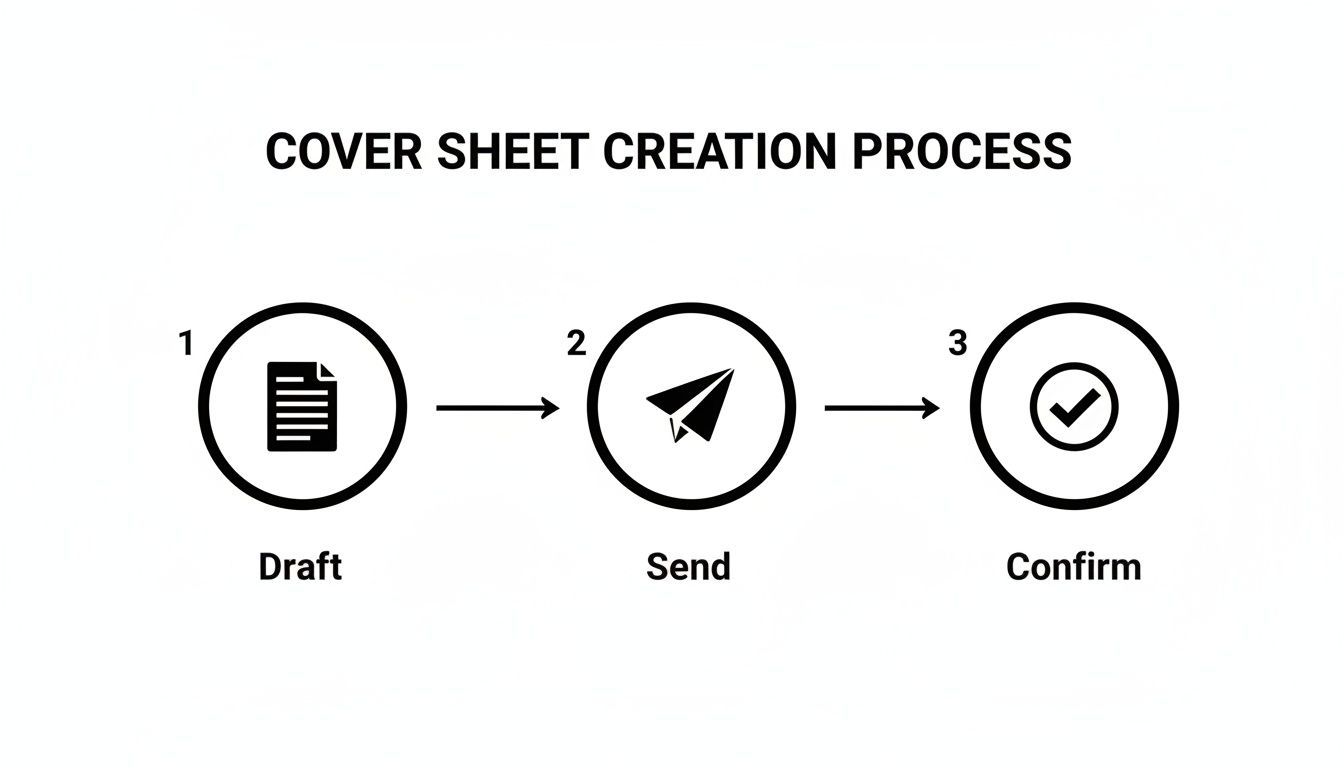
It’s a simple visual, but it drives home an important point: a well-made template is the foundation for a smooth, successful fax every single time.
Adding the Message and Confidentiality Notice
Just below the main contact block, make sure to leave a generous amount of space for a message. This is where you can add specific context or instructions for the person on the other end. In your template file, you can just use placeholder text like, "[Insert brief message here]," as a reminder to customize it before sending.
Last but certainly not least, add a confidentiality statement at the very bottom. For many industries, especially healthcare and legal, this isn't just a good idea—it's a legal necessity.
A standard confidentiality notice is your first line of defense. It legally informs any unintended recipients that the information is privileged and not for them, instructing them on the proper course of action, which usually involves destroying the document and notifying the sender.
A classic notice usually says something like: "This facsimile is confidential and intended solely for the use of the individual to whom it is addressed. If you have received this fax in error, you are hereby notified that any disclosure, copying, or distribution is strictly prohibited."
Once your layout is perfect, save the file as a template (a .dotx file in Word, for instance). Now, when you're ready to send a fax, you'll need it in a reliable format. We have a great guide on how to convert Word documents to PDF, which is the universal standard for online faxing. This final step ensures your carefully designed template looks exactly as intended, no matter where it's viewed.
What Every Great Fax Cover Sheet Needs
Think of your fax cover sheet not as a mere formality, but as the control panel for your entire transmission. A well-designed template does more than just introduce your document; it ensures it lands in the right hands and protects you legally. Getting these details right from the outset can prevent a world of confusion, delays, and even serious compliance headaches, especially when you're handling sensitive information like Protected Health Information (PHI).
A vague subject line or a missing page count might seem like a small oversight, but they can cause big problems. Imagine sending a crucial multi-page contract, but the recipient's machine only spits out the first few pages. Without a clear page count like "Page 1 of 7", they might act on an incomplete document, leading to a major misunderstanding.
Core Contact and Routing Information
This is the absolute foundation of your cover sheet, and it needs to be crystal clear. Ambiguous details are just asking for your fax to get lost in a busy mailroom or shuffled between departments. Every solid template should have dedicated fields for this info.
Make sure your template includes:
- Sender Details: Your full name, company, direct phone number, and fax number. This tells the recipient exactly who you are and how to get back to you.
- Recipient Details: The person's full name, their department (if you know it), company, and their direct fax number. Honestly, double-checking this number is the single most important thing you can do.
- Date of Transmission: Always include the exact date you send the fax. It’s essential for good record-keeping.
This isn’t just about being meticulous; it's about making things work. In fact, we’ve seen that standardized templates can increase fax delivery success rates by as much as 35% in busy offices. An incredible 22% of all failed faxes are simply due to poorly formatted cover sheets with missing or unclear information.
The Subject Line and Page Count
The subject line is your chance to give the recipient instant context. A generic subject like "Documents" is practically useless. Be specific and, if possible, action-oriented. Try something like, "Signed Lease Agreement for 123 Main St" or "Urgent: Patient Referral for John Doe."
The page count is just as crucial. You should always specify the total number of pages, including the cover sheet itself. This tiny detail instantly confirms that the entire document was transmitted successfully and helps the recipient make sure everything is in the right order. For more ideas on how to frame your documents effectively, take a look at our detailed guide on fax cover letter examples.
Your subject line and page count are the two things people scan for first. Someone glancing at the fax machine should be able to figure out what the document is and confirm it's all there in under five seconds.
The Confidentiality Disclaimer
This is a non-negotiable, especially if you work in legal, finance, or healthcare. A confidentiality statement is a block of text, usually at the bottom, that serves as a legal safeguard. It puts anyone who might accidentally receive the fax on notice that the contents are private, privileged, and not intended for them.
A standard disclaimer will instruct an unintended recipient to destroy the document and notify the sender immediately. This simple paragraph can be your first line of defense against claims of negligence or even HIPAA violations if sensitive information ends up in the wrong hands. Make sure every template you use has one.
A one-size-fits-all cover sheet might get the job done for a quick, casual fax, but it’s a major misstep when you’re dealing with industry-specific rules and regulations. What you include—and what you leave out—can have real legal and professional consequences.
Your cover sheet isn’t just an introduction; it's a critical business tool. What a freelance graphic designer needs is worlds away from the requirements of a busy medical clinic or a law firm handling sensitive case files. You have to think beyond the basics of "To" and "From" and consider what your field truly demands.
Healthcare and HIPAA Compliance
If you're in healthcare, your fax cover sheet is on the front lines of protecting Protected Health Information (PHI) and staying HIPAA compliant. A generic template is a non-starter. You absolutely must include a clear, comprehensive confidentiality notice that specifically mentions HIPAA.
This isn't just a formality. Think about this: in 2024, an estimated 41% of U.S. healthcare providers still rely on faxes for patient records, sending over 8 billion pages a year. The Joint Commission found that a proper confidentiality notice can cut compliance violations by a staggering 50%. You can find some great examples and insights on report templates over on Canva's resource page.
Your healthcare cover sheet needs these key elements:
- A prominent HIPAA warning: State clearly that the information is confidential PHI.
- Misdelivery instructions: Tell anyone who receives it by mistake to destroy the fax immediately and notify you.
- Minimal patient info: Only include what's essential for identification to reduce the risk of exposure.
Legal and Real Estate Disclaimers
In law and real estate, faxes are often loaded with privileged or time-sensitive information. Your cover sheet needs to put up a clear wall of confidentiality right from the start. The whole point is to safeguard attorney-client privilege or the private nature of a big contract negotiation.
A legal cover sheet should have a bold disclaimer right at the top. It should state that the contents are confidential, meant only for the intended recipient, and may be legally privileged. This simple step helps prevent someone from accidentally waiving privilege if the document ends up in the wrong hands. For real estate deals, a similar notice drives home the confidential nature of offers, counter-offers, and financial data.
A well-worded disclaimer on your legal or real estate fax cover sheet acts as a legal shield. It formally declares the confidential nature of the communication before the recipient even sees the first page of the actual document.
Freelancers and Small Business Branding
For freelancers and small business owners, the cover sheet is a fantastic piece of marketing real estate. You might not have the intense compliance worries of a doctor or lawyer, but looking professional is just as important. Use this space to make a great first impression.
This is your chance to reinforce your brand. Add your logo, use your company colors, and pick a clean, modern font that matches your website and business cards. Treat it like a mini-letterhead. A polished, branded cover sheet tells clients you’re organized, professional, and serious about your work—and that’s a message every client wants to receive.
Industry-Specific Cover Sheet Customizations
Different fields have vastly different priorities when it comes to fax communication. The information that is essential for one industry could be irrelevant—or even a liability—for another. The table below breaks down some key modifications to consider for your own cover sheet template.
| Industry | Critical Information to Include | Recommended Disclaimer |
|---|---|---|
| Healthcare | Patient Name/ID (minimal), Date of Service, Medical Record Number. | HIPAA Confidentiality Notice: "This fax contains confidential, privileged Protected Health Information (PHI)… If you are not the intended recipient, you are notified that any dissemination is strictly prohibited…" |
| Legal | Case/Matter Number, Client Name, Document Title (e.g., "Motion to Dismiss"). | Attorney-Client Privilege Statement: "This communication is intended only for the use of the individual or entity to which it is addressed and may contain information that is privileged and confidential." |
| Financial Services | Account Number, Transaction ID, Name of Financial Advisor/Institution. | Financial Confidentiality Notice: "This information is intended only for the person or entity to which it is addressed and may contain private financial data… Unauthorized review or distribution is prohibited." |
| Real Estate | Property Address, Offer/Contract Number, Agent Name, and License Number. | Transaction Confidentiality Clause: "The contents of this fax are confidential and intended for the recipient specified in the message only. It is strictly forbidden to share any part of this message with any third party." |
| Creative/Freelance | Project Name or Number, Invoice Number (if applicable), Your Contact Information and Logo. | Copyright/Proprietary Information: "The materials included are the proprietary work of [Your Name/Company Name]. Any unauthorized use, reproduction, or distribution is prohibited." |
Ultimately, taking a few extra minutes to tailor your cover sheet to your industry's standards isn't just about looking good—it's about protecting yourself, your clients, and your business from unnecessary risk.
Using Your Template with Online Fax Services
You've put in the work to create the perfect, professional cover sheet template. Now what? The final piece of the puzzle is fitting it into your digital workflow. Fortunately, using a custom template with an online fax service is a world away from fussing with a physical fax machine, but there are a few things to keep in mind, especially when looking at free versus paid options.
Most modern fax services, including SendItFax, are built to handle the file formats you already use. That .docx file from Word or the .pdf you saved? They're good to go. The process itself is pretty simple: when you go to send your fax, you'll just upload two files instead of one. Make sure to select your cover sheet first, then your main document, and the service will merge them into a single, seamless transmission.
Free vs. Paid Tiers: A Practical Look
So, where do the free and paid plans differ? It almost always comes down to branding.
When you use a free service, you're usually trading cost for advertising. The platform will often tack on its own branded cover sheet to every fax you send. This page will be covered in their logo and marketing messages, which can seriously undermine the professional look you're trying to achieve.
This is exactly why upgrading to a paid or "almost free" plan can be a game-changer. For a very small fee, services like SendItFax let you remove their branding completely. This puts you back in control, allowing you to use your own custom template so your logo and professional layout are the first things your recipient sees.
Think of it this way: upgrading to a paid tier isn't just about unlocking features. It's about controlling your professional image. It's the difference between sending a business proposal in a plain, crisp envelope versus one with another company’s logo splashed all over it.
Making the Right Choice for Your Needs
The decision between a free and paid service really hinges on who you're faxing and why. Not all online fax platforms are built the same, so it pays to compare the details. If you're weighing your options, our in-depth online fax services comparison is a great resource for breaking down the pros and cons.
Here’s a quick way to think about it:
- When to Use Free Services: A free plan is perfectly fine for personal or informal faxes where branding is a non-issue. Think sending a signed form to your gym or a document to a relative.
- When to Upgrade to Paid: You should always opt for a paid service for any kind of professional or business-critical communication. This includes legal contracts, new client proposals, medical records, or any other document where your brand's credibility is on the line.
At the end of the day, having a custom cover sheet template saved in both DOCX and PDF formats gives you the power and flexibility to look professional on any platform. By picking a service that lets you upload your own design, you keep full control over your branding and make sure every fax you send is polished and impressive.
Your Top Cover Sheet Questions, Answered
Even with the best templates in hand, a few questions always pop up. I get it. You want to make sure every fax you send is professional and lands in the right hands without a hitch. Let's walk through some of the most common questions I hear from people just like you.
Think of this as your quick-reference guide for clearing up any confusion, so you can send your documents with total confidence.
Is a Fax Cover Sheet Actually Required by Law?
This is a fantastic question, and the answer is a classic "it depends." There isn't a sweeping federal law that says every single fax must have a cover sheet. However, in practice, it’s an essential safeguard that carries a lot of weight, especially depending on your industry.
For instance, if you're in healthcare, that cover sheet isn't just a formality—it's a critical tool. Including a specific HIPAA confidentiality notice is a fundamental step in protecting patient information. The same goes for the legal world, where a cover sheet helps formally establish and maintain attorney-client privilege.
While not always a strict legal mandate across the board, using a cover sheet is always the safest and most professional choice when you're sending any kind of sensitive information. It's a simple step that adds a powerful layer of protection.
Can I Put My Company Logo on a Cover Sheet Template?
Absolutely—and you really should. Adding your logo is probably the quickest win for making your faxes look polished and reinforcing your brand. It immediately signals to the recipient who the fax is from, which is a huge plus in a busy office.
When you're working in a program like Microsoft Word or Google Docs, just insert your logo file into the header of the document. A high-quality PNG or JPEG file usually works best. This places your brand right at the top, making it the very first thing your recipient sees.
What’s the Real Difference Between Free and Paid Cover Sheets?
It almost always boils down to one thing: branding and customization. Most online fax services, including ours, structure their plans with different benefits in mind.
- Free Services: These plans typically attach a cover page with their branding on it. That means your fax will arrive with another company's logo and messaging, which can look a bit unprofessional if you're trying to represent your own business.
- Paid Plans: Upgrading to a paid plan, like the "Almost Free" option from SendItFax, gets rid of all that third-party branding. You get to upload your own custom template, keeping your professional image front and center. Paid tiers also give you the control to skip the cover sheet entirely when you don't need one.
What Is the Most Important Info to Put on My Cover Sheet?
Every field on a template serves a purpose, but a few details are absolutely mission-critical. Honestly, getting one of these wrong is the number one reason faxes get lost or delayed in a busy office environment.
Make sure these non-negotiable details are always crystal clear:
- The recipient's full name and their direct fax number.
- Your full name, company, and return contact information.
- The date the fax is being sent.
- A clear, specific subject line that says what the fax is about.
- The total number of pages, including the cover sheet itself (e.g., "Page 1 of 5").
Ready to send your documents with a polished, professional look? With SendItFax, you can use your own custom cover sheet template to ensure your brand stands out. Start faxing in seconds with SendItFax.
Related Posts
Fax Cover Sheet to IRS: How to Send It Right
MS Office Fax Cover Sheet Template: Create and Customize