Best Internet Fax Service: Top Picks for 2026
A deadline is approaching, and you need to send one short document to a fax number before the office closes. That's a very different problem from running a business that sends, receives, stores, and audits faxes every month. The best internet fax service depends on that workflow, not on brand recognition.
This comparison organizes the choices around real buying situations. It considers free or pay-per-fax access, monthly page allowances, supported file types, mobile and email workflows, security and compliance, geographic coverage, overage exposure, storage, and administrative controls. For occasional sending in the United States and Canada, SendItFax stands out for its free tier and Almost Free plan, but it isn't the universal answer for teams, regulated healthcare operations, or companies that need faxing inside a broader communications suite. If fax is only one part of your business communications stack, compare it with wider Business VoIP services before choosing a standalone tool.
1. SendItFax
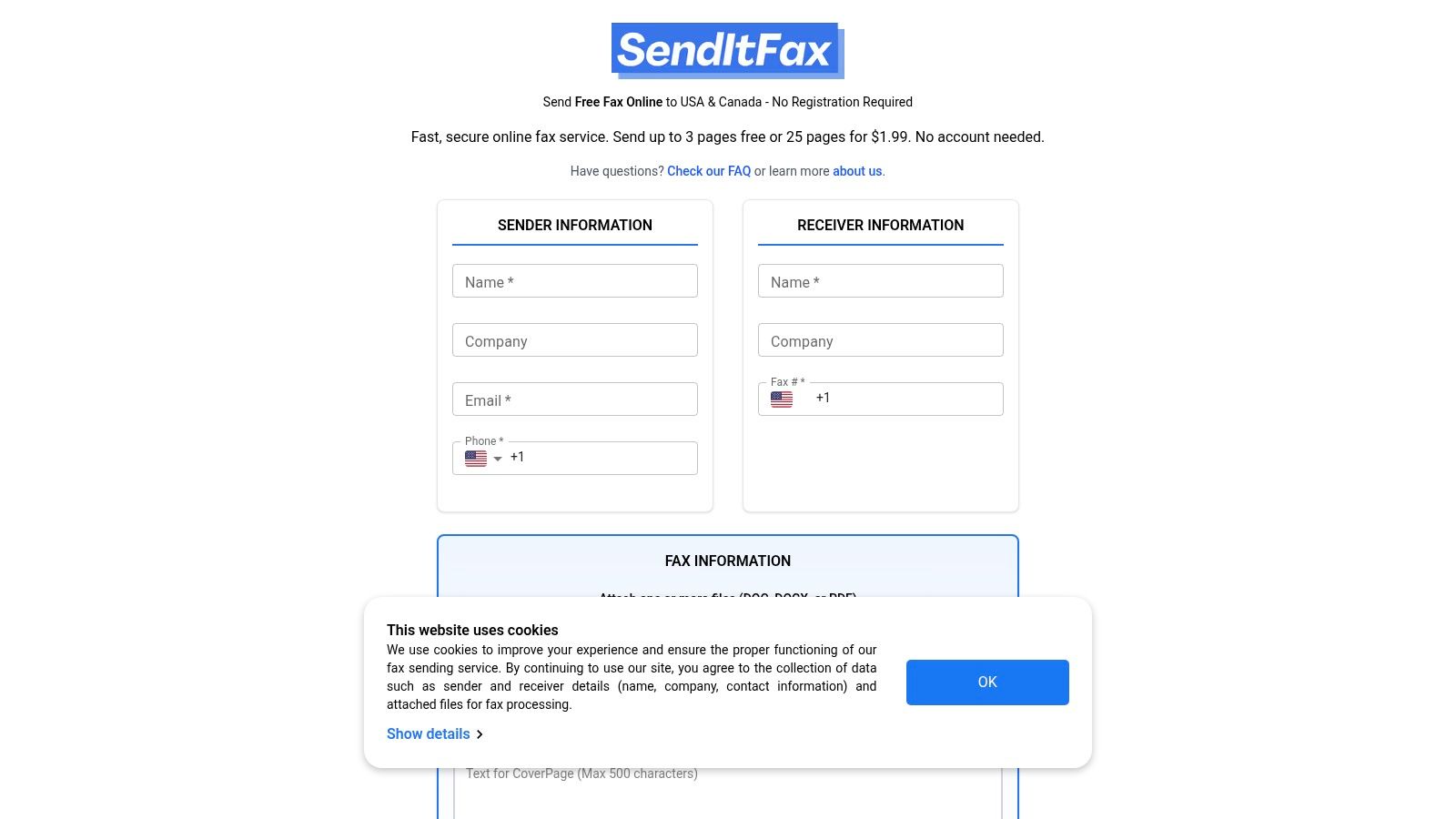
SendItFax is built for the person who needs to send a fax now, not manage a permanent fax operation. You can open the service in a browser, enter the sender and recipient details, upload a DOC, DOCX, or PDF, and send to a fax number in the United States or Canada without creating an account. That no-registration workflow makes it especially practical for freelancers, remote workers, small businesses, and anyone dealing with a one-off form or contract.
The free option supports up to three pages plus a cover page, with a limit of five free faxes per day. The cover includes SendItFax branding. If presentation matters, or if the document is longer, the Almost Free option costs $1.99 per fax, supports up to 25 pages, provides priority delivery, removes SendItFax branding, and lets you omit the cover page. Those figures and plan details are available in the SendItFax service information.
Best for occasional North American sending
The trade-off is clear. SendItFax has no monthly allowance to monitor, no account to administer, and no subscription commitment. In exchange, it isn't designed for receiving faxes, international coverage, shared inboxes, long-term document management, or enterprise policy controls. The free tier is suitable for a short, non-sensitive transmission where branding is acceptable. The paid tier is better for a longer document or a professional recipient who shouldn't see third-party branding.
The service collects sender and receiver details to process and confirm delivery, and its cookies, terms, and privacy practices are described in its FAQ, Terms of Use, and Privacy Policy. For regulated records, buyers should verify whether the service provides the contractual and technical safeguards their workflow requires rather than assuming that any browser-based fax tool is compliant. Healthcare fax compliance guidance specifically highlights the importance of a signed Business Associate Agreement, encryption, and audit logging for PHI workflows.
For a practical walkthrough of browser-based sending, see this guide to a web-based fax service.
Best fit: Choose SendItFax when you need a fast, low-cost fax to a U.S. or Canadian number and don't need an account, recurring page pool, or receiving number.
2. FAX.PLUS
FAX.PLUS is the more natural choice when “occasional fax” means occasional activity inside a recurring business workflow. It supports email-to-fax, mobile apps, desktop access, number porting, team administration, and an API, so employees can send documents without relying on one person's browser session. Its iOS and Android apps also suit staff who need to send or review faxes away from a desk.
The platform offers a free plan for testing or light usage, with 10 total pages, while paid tiers provide defined page allowances and overage rates. That makes it easier to compare expected usage with the cost of exceeding a plan. The FAX.PLUS platform also provides local and toll-free numbers, unlimited fax storage, CSV log export, and integrations such as Slack and Zapier.
Stronger controls for growing teams
FAX.PLUS has a useful separation between ordinary business faxing and regulated healthcare faxing. A signed BAA and HIPAA compliance are available on the Enterprise plan, not on the basic tiers. That matters because a low-priced plan may be suitable for contracts or administrative forms but unsuitable for workflows involving protected health information.
The platform's admin console, team controls, data residency information, and trust documentation give an IT buyer more to evaluate than a simple send form. Lower tiers can impose page caps per fax, so a large document may need to be split before transmission. That's a small inconvenience for ordinary documents, but it can become an operational issue when a team routinely sends lengthy records.
FAX.PLUS is a good middle ground for a small business that has moved beyond one-off faxing but doesn't need an entire phone and collaboration platform. It's less compelling if you only need a single fax, and HIPAA users should budget for the Enterprise level rather than treating the free plan as a compliance solution.
Best fit: Pick FAX.PLUS for light recurring use, mobile sending, team administration, or a business that may later need API-based workflows.
3. eFax
eFax suits buyers who want a recognizable online fax brand with a broad set of established business functions. Its plans include secure online storage, mobile and desktop apps, e-signing, and email-to-fax, which means users can work from an inbox, an application, or a web-based account. Business and Corporate tiers add multiple users and numbers, making the service more appropriate for departments than for a single occasional sender.
The page model is also more suitable for recurring operations than a per-fax service. Plans provide between 200 and 500 pages per month, depending on the tier, as described in the eFax service offering. Buyers should distinguish between a pooled page allowance, sent and received limits, and overage rules before committing, because the headline page number doesn't alone reveal how a team will be billed.
A broad feature set with a pricing caveat
eFax becomes more relevant for regulated U.S. industries at the Business and Corporate levels, where HIPAA compliance and a signed BAA are included. Corporate adds HITRUST and APIs. Those distinctions are important for healthcare organizations, because compliance is tied to the actual plan and contractual arrangement, not just to the existence of encryption or a fax number.
The downside is purchase transparency. Pricing can be higher than some competitors at similar page volumes, and the plan configurator may not show a complete monthly list price until you proceed through the selection process. That makes eFax worth shortlisting when storage, e-signing, live support, and multiple access methods matter, but it also means procurement teams should request the full recurring cost, user count, number fees, and overage terms.
For a broader comparison of online fax products, consult this online fax services comparison. Use it as a starting point, then verify current plan terms directly with eFax before buying.
Best fit: Choose eFax when your organization values storage, e-signing, multiple access methods, and established healthcare-oriented business tiers.
4. SRFax
SRFax is focused on North American faxing and is particularly well aligned with healthcare organizations that want the compliance conversation to be explicit. Its healthcare plans support a signed BAA, multiple user accounts, unlimited authorized email addresses, consolidated billing, and unlimited storage. Those controls address a practical problem that consumer comparisons often miss: a clinic needs to govern who can send and retrieve documents, not merely upload a file.
The service supports printer-driver and API options, and its healthcare offering includes EMR and EHR integration options. It also publishes healthcare-oriented pricing tiers and overage terms, which can make budgeting easier than comparing a general-purpose plan with a vague “business” label. The SRFax website is the right place to verify the current allowance and cost for a specific healthcare tier.
Designed around the healthcare use case
SRFax's geographic focus is both an advantage and a limitation. U.S. and Canadian data handling can align with organizations whose operational requirements are concentrated in those countries, but the service isn't the right choice for a company that needs broad international fax coverage. An international business should confirm destination support before porting a number or migrating a department.
The interface is more utilitarian than app-first competitors, and SRFax doesn't emphasize the same polished mobile experience as services built around dedicated applications. That may matter less in a clinic where staff send from email, an EMR, or a shared workstation. The more important questions are whether the plan supports the required users, storage, integrations, audit expectations, and contractual safeguards.
SRFax is therefore not merely a cheap alternative to a general fax service. It's a focused option for organizations that need North American coverage and want healthcare controls to be central to the purchase.
Best fit: Select SRFax for U.S. or Canadian healthcare workflows where a BAA, shared access, storage, and clear healthcare plan structure matter more than a modern interface.
5. MyFax
MyFax is aimed at individuals and small businesses that need a recurring number and a manageable web portal without adopting a full communications suite. Plans include a local or toll-free fax number, email-to-fax, mobile applications, and access to MyFax Central. Number porting and international numbers are also available, which gives it more reach than a service limited to outbound U.S. and Canadian sending.
The portal is useful for a small team that needs to find documents after they arrive. Users can search and tag archived faxes, review usage reports, and export information in CSV or Excel formats. The service also offers a 14-day free trial and doesn't require a long-term contract, according to the MyFax service details.
Simple recurring faxing, with overage discipline required
MyFax's main budgeting risk is its overage model. U.S. fax overages are charged at $0.10 per page, so a plan that looks economical at normal usage can become less attractive when monthly activity regularly exceeds the included allowance. Teams should estimate both sent and received pages, then compare the likely overage cost with a higher plan or a different provider.
That model makes MyFax more suitable for predictable small-business activity than for a department with fluctuating volume. It also has fewer enterprise and compliance options than specialists such as SRFax or the higher tiers of eFax. A business handling regulated information should verify whether the available controls and contractual terms meet its obligations before using it for sensitive workflows.
MyFax works best when the buyer values a familiar portal, searchable archives, number options, and straightforward setup. It's less suitable when the priority is a BAA-centered healthcare deployment, advanced API orchestration, or unlimited faxing inside a larger communications system.
Best fit: Use MyFax for a small business that needs a number, email and mobile access, searchable archives, and predictable recurring usage.
6. RingCentral RingEX with Unlimited Internet Fax
RingCentral is a different category from the other services on this list. RingEX combines internet fax with business calling, SMS, video, team messaging, integrations, and administrative controls. Fax is therefore not the product's entire purpose. It's one function inside a broader unified communications environment.
The service includes unlimited internet fax in RingEX plans, while email-to-fax is available on Advanced and Ultra tiers. The RingCentral RingEX platform also targets IT-managed organizations that need scalability, platform administration, and uptime service-level agreements rather than a simple fax-only account.
The right answer when fax isn't a standalone requirement
RingCentral can be financially and operationally sensible when an organization already needs its phone and collaboration services. Unlimited fax removes the need to count pages within a conventional fax allowance, while the shared platform gives administrators one environment for users and communications policies.
That same structure makes it excessive for someone who only needs to send a few documents. RingCentral requires a full RingEX user license, and public pricing varies by tier and is charged per user. A buyer comparing only the cost of sending a fax may find a standalone service more economical. A buyer replacing several communications tools may reach the opposite conclusion.
This is also the option to consider when fax must sit beside calling, messaging, and video rather than in a separate portal. The platform's broader integrations and controls can reduce tool sprawl, but they introduce a larger implementation and licensing decision.
For small organizations weighing a standalone tool against a communications suite, this guide to the best online fax service for small business offers useful context.
Best fit: Choose RingCentral when your organization already needs a unified communications platform and fax should live inside that environment.
7. iFax
iFax takes an app-first approach. Users can send and receive through web, iOS, Android, Windows, and Mac applications, as well as email-to-fax and a branded WebFax page. That range makes it a strong candidate for clinics, small teams, and mobile workers who need more than a basic upload form.
The service includes team inboxes, assignment tools, templates, and administrative features. It also offers OCR, data extraction, and connections with Google Drive, Dropbox, and OneDrive. Business plans can provide HIPAA options and a BAA, while the service describes U.S. data residency on AWS in Oregon. Current availability and tier restrictions should be verified on the iFax platform.
Flexible for teams that want automation
iFax lets buyers adjust pages, numbers, and team licenses rather than forcing every organization into the same package. That can help a small clinic right-size its account, particularly when the team needs shared inbox functionality but doesn't have the volume or complexity of a large enterprise.
The advanced functions come with important conditions. HIPAA and enhanced security features are placed on higher tiers, and fair-use and credit policies apply. OCR and data extraction can also change the operational value of a fax service, but buyers should test whether the extracted information is accurate enough for their documents before building a process around it.
iFax is a stronger choice than a basic consumer fax site when staff need modern apps, document routing, templates, and integrations. It isn't automatically the least expensive choice, and a compliance-sensitive buyer should review the BAA, storage location, access controls, retention, and audit capabilities for the exact plan under consideration.
Best fit: Pick iFax for mobile teams, clinics, and small businesses that want shared inboxes, modern applications, templates, and document automation.
Top 7 Internet Fax Services Comparison
| Service | Implementation Complexity 🔄 | Resource Requirements ⚡ | Expected Outcomes ⭐📊 | Ideal Use Cases 💡 | Key Advantages |
|---|---|---|---|---|---|
| SendItFax | Very low, browser upload, no signup 🔄 | Minimal, browser + files; optional Stripe payment ⚡ | Fast, one-off delivery with confirmations; limited to US/CA ⭐⭐⭐⭐ 📊 | Occasional, time-sensitive sends for individuals/freelancers 💡 | No-registration free tier; low per‑fax cost; simple UX |
| FAX.PLUS | Low–medium, apps, email-to-fax, admin console 🔄 | Moderate, user accounts, storage, API access ⚡ | Scalable and reliable with clear quotas; good for growing teams ⭐⭐⭐⭐ 📊 | SMBs to enterprises needing integrations and team controls 💡 | Mature feature set, free test tier, strong security docs |
| eFax | Medium, account/tier setup and platform onboarding 🔄 | Higher, subscription tiers, multi-user/add-ons ⚡ | Robust platform with broad features and compliance options ⭐⭐⭐⭐⭐ 📊 | Businesses requiring established vendor, support & compliance 💡 | Deep platform features, e-signing, strong support & compliance |
| SRFax | Medium, healthcare-focused setup and admin controls 🔄 | Moderate, healthcare plans, BAA, integrations ⚡ | HIPAA-ready workflows for US/Canada healthcare customers ⭐⭐⭐⭐ 📊 | Healthcare providers and regulated organizations in US/CA 💡 | Clear healthcare pricing, BAA, EMR/EHR integrations |
| MyFax | Low, simple portal and email-to-fax setup 🔄 | Low–moderate, subscription with overage fees ⚡ | Straightforward send/receive with portal reporting ⭐⭐⭐ 📊 | Small teams needing portal, search and basic reporting 💡 | Portal features (search/tagging), easy setup, 14‑day trial |
| RingCentral (RingEX) | High, full UCaaS deployment and admin configuration 🔄 | High, per-user RingEX licenses; IT-managed infrastructure ⚡ | Unified communications with unlimited fax and enterprise SLAs ⭐⭐⭐⭐⭐ 📊 | Large organizations wanting consolidated UCaaS + fax 💡 | Unlimited fax in UC suite, enterprise-grade controls & SLAs |
| iFax | Low–medium, app-first with modern admin features 🔄 | Moderate, apps, team licenses; higher tiers for HIPAA ⚡ | Mobile/desktop-first UX with OCR/data extraction options ⭐⭐⭐⭐ 📊 | SMBs and clinics needing mobile fax, OCR and EHR integrations 💡 | AI/OCR, team inbox/assignment, flexible integrations and plans |
Match the Service to Your Faxing Pattern
There isn't one universal winner because the services solve different operational problems. SendItFax is the practical choice for an occasional, time-sensitive fax to the United States or Canada when you don't want to create an account or pay a monthly subscription. Its free option handles short documents, while the $1.99 Almost Free option supports longer transmissions, priority delivery, and a cleaner presentation.
For lighter recurring workflows, compare FAX.PLUS and MyFax. FAX.PLUS is better suited to teams that value mobile apps, email-to-fax, APIs, administration, and defined page and overage rules. MyFax is a simpler fit when the priority is a recurring number, searchable archives, mobile access, and usage reporting. Watch the overage model closely if your monthly volume varies.
Choose eFax, SRFax, or iFax when compliance, storage, multiple users, or healthcare workflows drive the decision. eFax offers broad platform access and healthcare features on Business and Corporate tiers. SRFax is more focused on North American healthcare operations, shared access, storage, and BAA-supported plans. iFax is attractive when mobile use, team inboxes, templates, OCR, and integrations matter, but advanced security and compliance features require the appropriate tier.
RingCentral belongs on the shortlist when fax is part of a wider communications platform. It can be overkill for fax alone, but its unified calling, messaging, video, administration, and unlimited internet fax are relevant to organizations that want one environment for collaboration.
Before buying, work through these questions:
- Estimate monthly pages: Separate pages sent from pages received, and account for seasonal spikes.
- Confirm file support: Check whether your team sends DOC, DOCX, PDF, image files, or documents generated by another system.
- Verify destination coverage: SendItFax and SRFax focus on North America, while other services offer broader number and international options.
- Identify compliance needs: Determine whether you need a BAA, encryption controls, audit logging, data residency, or retention policies.
- Model overage and per-fax costs: Compare a recurring allowance with pay-per-fax pricing and the cost of exceeding the plan.
- Check operational details: Confirm whether branding, priority delivery, storage, mobile access, team permissions, or number porting affects the purchase.
The best internet fax service is the one whose limits match your actual workflow. A no-account browser form is efficient for a one-time document, while a healthcare department needs contractual safeguards and administrative visibility. Start with the fax pattern, then select the provider.
SendItFax lets you send DOC, DOCX, and PDF files to U.S. and Canadian fax numbers from any browser, with a free option for short documents and a $1.99 Almost Free option for longer, branding-free faxes. If that matches your occasional or time-sensitive workflow, visit SendItFax and send your document without creating an account.
Related Posts
Faxing a Cover Letter: A Practical Guide for 2026
What Is a Fax Number Used for Today? 2026 Guide