How to Fax Online Free Your Complete Guide
Believe it or not, faxing is far from obsolete. In many professional circles, it’s still a crucial tool. Fields like healthcare, law, and government agencies often depend on faxing because of its long-established security and legal acceptance. When you need to send a signed contract or sensitive medical records, the direct point-to-point connection of a fax is often the required method.
Thankfully, the clunky, noisy machine hogging a corner of the office has been replaced by a much smarter digital alternative. Online faxing gives you the same reliability and security but without any of the physical hardware. This modern approach essentially turns your computer or smartphone into a powerful fax machine you can use anytime, anywhere.
The Modern Perks of Digital Faxing
Switching to a digital fax service isn't just about ditching old hardware; it introduces real benefits that improve the entire process. You're no longer tethered to a physical location. You can send documents from your home office, a coffee shop, or while traveling—all you need is an internet connection.
This flexibility also comes with major cost savings. You can completely eliminate expenses for:
- Dedicated phone lines: Online faxing works over the internet, so you can cut that extra monthly bill.
- Paper and ink: Since everything is handled digitally, you save on supplies and reduce your environmental footprint.
- Machine maintenance: Forget about paper jams, toner replacements, and service calls forever.
The proof is in the numbers. The global online fax market is exploding and is projected to reach over $8.3 billion by 2027. This growth is driven by a clear demand for secure, paperless communication tools. You can dive deeper into these online fax statistics here.
Security is another huge win for online services. Reputable platforms use strong encryption to protect your documents in transit, offering a level of privacy that a shared office machine could never guarantee. Learning how to fax online free is more than just a modern convenience—it's about adopting a faster, cheaper, and more secure way to handle essential communication.
Sending Your First Free Fax Online
Jumping into the world of online faxing is a lot easier than you might think. Forget the days of clunky machines and busy signals. If you know how to send an email with an attachment, you've already got the basic skills down.
Let's walk through how it works in the real world. You find a free service, get your document ready, plug in a few details, and click send. It's a process that usually takes less than five minutes from start to finish.
Getting Your Document Ready
First thing's first: you need a digital copy of what you want to send. The good news is that most free online fax services are pretty flexible with file formats, so you probably won't have to mess around with any special software.
The most common and reliable formats are:
- PDF: This is the best choice. It locks in your formatting, so what you see on your screen is exactly what they'll get on their end.
- DOCX or DOC: Standard Microsoft Word files are almost universally accepted.
- JPG or PNG: Perfect for sending a quick scan of a signed document, a receipt, or even a photo.
Once your file is saved and ready, you'll just need to upload it. Look for a big, obvious button on the website labeled "Upload File" or "Attach Document." For a more detailed look at the process, our guide on how to free fax from computer breaks it down even further.
Most platforms keep their interface clean and simple, designed to get you in and out without any confusion.
This is a classic layout. You can see the clear fields for the recipient's info and the prominent spot to add your file.
Plugging in the Sender and Recipient Details
With your document attached, you're on the home stretch. Now, you just need to tell the service where the fax is coming from and where it's going. This part is critical for a successful delivery, but it’s just a few simple fields.
Here’s what you’ll be asked to fill in:
- Your Details: Just your name and email address. The email is super important—that's how you'll get the confirmation receipt once the fax goes through.
- Recipient’s Details: Their name and, most importantly, their fax number. For the U.S. and Canada, you'll just enter the area code and the 7-digit number.
- International Faxing: Sending a fax overseas? You’ll need to add the country code first. For instance, a fax going to the UK would start with +44, followed by the local number.
My Two Cents: I can't stress this enough: double-check that fax number. A single typo is the number one reason faxes fail. Taking five extra seconds to confirm it can save you a whole lot of headache.
Finally, you’ll usually see an option to add a cover page. This is completely optional, but I find it really helpful for adding context. You can pop in a quick subject line like "Signed Agreement for Project X" or "Invoice #1045."
Once all the fields are filled, go ahead and hit that send button. Within a few minutes, you should get an email in your inbox letting you know it was delivered successfully. And that’s it—you’ve sent a fax without ever touching a fax machine.
Getting to Know the Limits of Free Online Faxing
Free online faxing is an incredible tool, but it's important to go in with your eyes open. These services almost always have some ground rules, and knowing them upfront will save you a headache later. Think of it less like a free-for-all and more like a generous free sample—it gives you exactly what you need for a quick task, but it has its boundaries.
https://www.youtube.com/embed/vwF_GI5AWh0
Page and Daily Sending Caps
The most common restriction you'll bump into is a page limit. Most free providers will cap your faxes at 3 to 5 pages per send. This is more than enough for a signed form, a receipt, or a quick letter, but it won’t work for that 20-page business proposal you need to send.
On top of that, you’ll likely run into a daily limit. This could be anywhere from 2 to 10 faxes within a 24-hour window. These caps are in place to prevent the system from being overwhelmed and to keep the service fair for everyone who just needs to send a fax every now and then.
What You Usually Get for Free
Even with the limits, the free versions pack in all the essentials for a successful fax. You’re not just getting a bare-bones tool; you’re getting a functional one.
Here’s what you can typically expect:
- File Format Flexibility: They almost always accept the most common file types, like PDF, DOC/DOCX, and image files like JPG or PNG.
- A Simple Cover Page: You’ll get the option to add a basic cover page where you can fill in your name, the recipient's name, and a quick note.
- Delivery Confirmation: You'll get an email telling you whether your fax went through successfully or if there was an error. No more guessing games.
This whole process is designed to be incredibly straightforward, as you can see here.
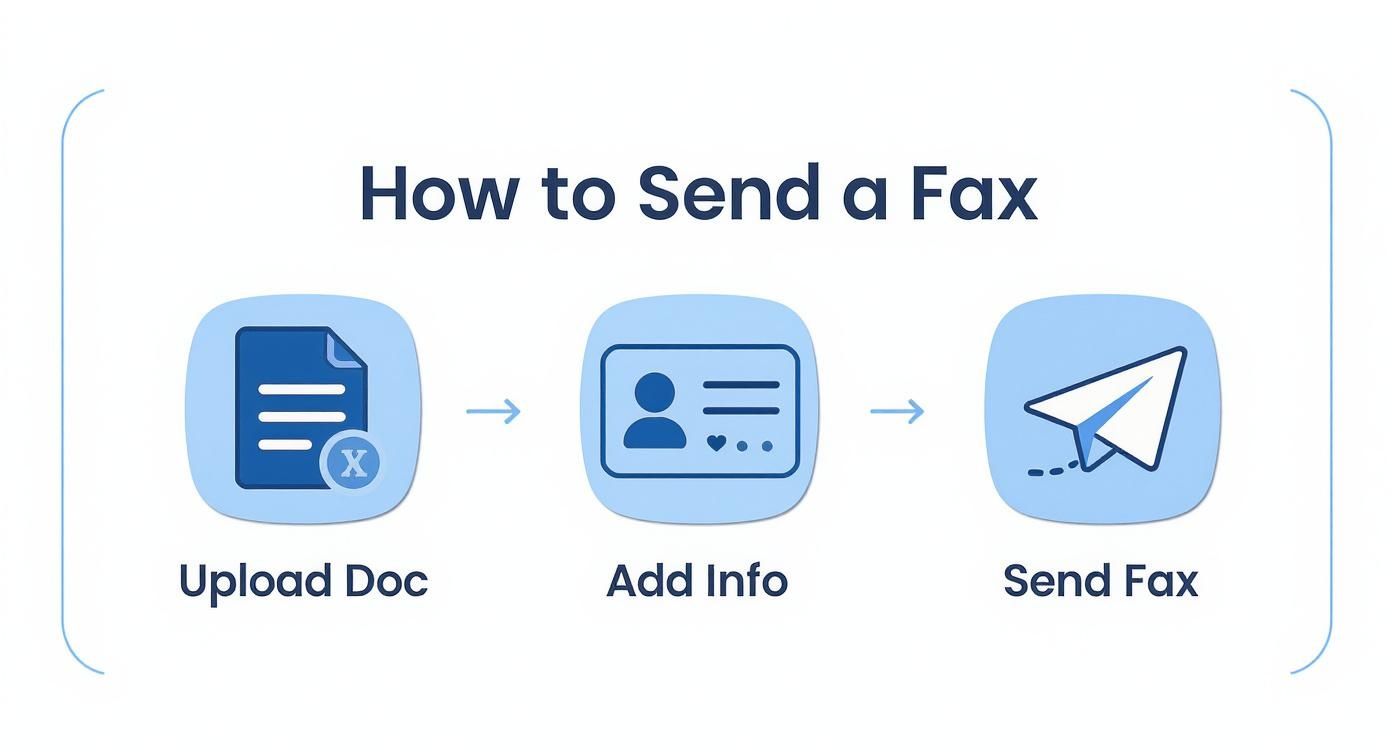
It really is as simple as uploading your document, plugging in the details, and hitting send.
When Is It Time to Upgrade?
Free services are a lifesaver for those one-off "I can't believe I still need to fax this" moments. But what if you find yourself needing to fax more regularly? That’s where paid plans come in.
Upgrading usually unlocks higher page limits, lets you send more faxes per day, and often removes the provider's branding from your cover page, which looks much more professional. Some even offer priority delivery. If you're weighing your options, diving into an online fax services comparison can give you a clear picture of what's out there.
To help you see the differences at a glance, here’s a quick rundown of some popular options and what their free tiers typically offer.
Comparing Popular Free Online Fax Providers
This table compares the key features and limitations of leading free online fax providers to help you choose the best fit for your needs.
| Service Provider | Free Pages per Month | File Formats Supported | Includes Cover Page |
|---|---|---|---|
| SendItFax | 10 | PDF, DOCX, XLSX, JPG, PNG | Yes |
| FaxZero | 15 (5 faxes) | PDF, DOC, DOCX | Yes (with ads) |
| GotFreeFax | 6 (2 faxes) | PDF, DOC, DOCX, JPG | Yes |
| MyFax Free | 10 | Over 170 formats supported | Yes |
As you can see, the limits and features can vary quite a bit, so it's worth checking which one aligns best with what you need to send.
The bottom line: Free services are built for convenience and occasional use. They provide a reliable way to send a quick document without cost, but for recurring business needs or sending sensitive, multi-page documents, a low-cost upgrade is often the smarter choice.
Is Sending a Fax Online Safe? A Look at Security and Privacy
When you're dealing with sensitive documents—think contracts, legal papers, or medical records—security is non-negotiable. One of the best things about online faxing is that it can actually be more private than using that old machine in the corner of the office. No more confidential papers sitting out on the tray for anyone to glance at.
Think of a good online fax service as a secure courier for your digital files. These platforms use end-to-end encryption, which essentially locks your document in a digital vault the second you send it. It only gets unlocked when it arrives at the destination, making it incredibly difficult for anyone to peek at the contents along the way.
This level of digital security is a big reason why so many businesses are making the switch. In 2024, more than 60% of small businesses in the U.S. turned to free online fax services for at least some of their needs, drawn by robust features like encryption and compliance with privacy laws. You can dig deeper into the growth of the online fax market here.
A Few Smart Habits for Protecting Your Information
While the service handles the heavy lifting on the tech side, you still have a part to play in keeping your faxes safe. A few simple precautions can make all the difference.
- Stick to Secure Wi-Fi: Sending a fax from a public network at a café or airport is risky. Always use a trusted, password-protected network, like the one at your home or office.
- Double-Check the Fax Number: This is where most mistakes happen. A single mistyped digit could send your private information to the wrong person. It’s worth taking an extra second to confirm.
- Check the Privacy Policy: Get a clear picture of how the service handles your data. Most quality free services, for your own protection, will delete your files from their servers shortly after a successful delivery.
For an extra layer of security and convenience, many people choose to route their incoming faxes directly to their email. We break down how this works in our guide on integrating fax to email workflows.
By pairing the built-in security of a service like SendItFax with these common-sense habits, you can send your documents with the confidence that they're protected from your screen to the recipient's machine.
What to Do When Your Free Fax Fails
Sooner or later, you’ll probably see a “transmission failed” email pop into your inbox. It happens, even with the best services. But don’t panic—these problems are almost always a quick fix.
The trick is to avoid just hitting "resend" over and over. Instead, take a moment to figure out why it failed. For instance, a "line is busy" error is pretty straightforward; the receiving machine was tied up. The best move here is to simply wait 15-20 minutes and try again. A more generic "failed" message, however, usually means the issue is on your end.
Your Go-To Troubleshooting Checklist
Before you try sending that fax again, run through these common culprits. I’ve found that one of these is almost always the reason a fax doesn't go through.
- Did you dial correctly? It sounds simple, but a single wrong digit is the number one cause of failed faxes. Double-check the fax number, including the full area code.
- Is your file okay? Make sure you uploaded an accepted format like a PDF, DOCX, or JPG. Also, check that you haven't gone over the page limit for the free service.
- How’s your internet? A flaky Wi-Fi connection can cut out while your document is uploading, causing the whole process to fail. Make sure your connection is solid before you hit send.
Expert Tip: Pay close attention to that confirmation email. A successful fax will be clearly marked as "Delivered." If it failed, the email will often include a reason or an error code that points you directly to the problem.
Working through these simple checks will help you diagnose why your attempt to fax online free hit a snag. A few seconds of investigation can save you a lot of frustration and make sure your next try is a success.
A Few More Things You Might Be Wondering
Even after you've sent your first free fax, a few questions might pop into your head. That's completely normal. Understanding the ins and outs of the service you're using is smart, especially when you're dealing with important paperwork. Let's tackle some of the most common questions people have.
So, Can I Get Faxes Sent To Me for Free?
That’s probably the most common question we hear, and the honest answer is almost always no. Think of free services as a one-way street—they’re fantastic for sending documents out, but not for receiving them.
To receive a fax, you need a dedicated fax number that’s always on and waiting for transmissions. This is the core feature you get when you upgrade to a paid plan. With a subscription, you're assigned your own virtual number, and any faxes sent to it land right in your email inbox, usually as a neat PDF.
What Happens to My Files After I Send Them?
Privacy is a big deal, and any good service knows that. Generally, free fax platforms will hold onto your file only for as long as it takes to get the fax delivered successfully. Once they get confirmation that it went through, your document is usually wiped from their servers pretty quickly.
A pro tip: Before sending anything sensitive, take two minutes to skim the service's privacy policy. It will tell you exactly how they handle your data and for how long. It's a small step that provides a lot of peace of mind.
Do I Have to Download or Install Anything?
Nope, and that's the beauty of it. The best platforms for sending a free fax online are completely browser-based. You don't have to download any clunky software or install a special app.
If you can open a web browser on your computer, tablet, or phone, you’re good to go. This keeps your devices clean and means you can fire off a fax from literally anywhere you have an internet connection.
Can I Send a Fax to Another Country?
You bet. Many free services allow you to send faxes internationally, but you'll want to check the fine print. Often, the free plan might restrict you to certain countries or have a lower page limit for international faxes compared to sending one across town.
Before you hit send on an international document, just double-check two things:
- Make sure the country you're faxing to is on their supported list.
- Get the formatting right. You’ll need the proper country code followed by the full local number.
Ready to put this all into practice? SendItFax lets you send up to three pages completely free, with no account needed. If you've got a bigger document or want a professional cover sheet, our Almost Free plan is the perfect next step. Give it a try and see just how simple it is.
Related Posts
What Is a Fax Cover Sheet and Why It Still Matters
Fax Number Lookup: How to Find and Verify Any Fax Number