How to Fax from Computer Free: A Quick Guide
It might seem old-school, but yes, you can absolutely fax from your computer for free. Web-based fax services make it possible to upload a document, punch in the recipient's fax number, and send it straight from your browser. No fax machine required.
Why Bother Sending a Fax From Your Computer?
In a world of email and instant messaging, faxing feels like a relic. So why is it still around? The truth is, many industries—think legal, healthcare, and government—still depend on faxing as a secure way to send sensitive documents. Knowing how to send a fax from your computer is the perfect bridge between their world and ours.
This isn't just a neat trick; it's a practical solution. Forget about wrestling with a clunky machine, dealing with paper jams, or hearing that dreaded busy signal. Now you can send critical files from anywhere you have an internet connection.
The Real-World Perks of Online Faxing
Once you learn how to fax from a computer for free, you'll see the practical benefits pile up:
- It’s Cheaper: You completely sidestep the costs of paper, ink, toner, and machine maintenance.
- It’s More Secure: Good online fax services use encryption to protect your documents. That's a lot safer than a fax machine spitting out sensitive papers in an open office for anyone to see.
- It’s Incredibly Convenient: Need to send a signed contract from a coffee shop or a medical form from your home office? No problem. You're no longer tied to a physical machine.
- It’s Greener: Going digital means less paper waste, which is always a good thing.
The move from hardware to software isn't new. The first computer-based fax board actually came out way back in 1985, setting the stage for the online services we use today.
The bottom line is simple: sending a fax online is faster, cheaper, and often more secure than messing with a traditional machine. It ensures your important documents get where they need to go.
Before you jump in, it’s also helpful to understand what a fax number is and how these numbers work in the digital age.
Choosing the Best Free Online Fax Service for Your Needs
Not all free fax services are created equal. It's easy to assume they all do the same thing, but the devil is truly in the details. What seems like a simple, free solution can quickly turn into a headache if you don't know what to look for before uploading your documents.
The first thing I always check is the limitations. Most free plans have strict caps on how much you can actually send. For example, a service might let you send faxes of up to three pages, with a limit of five faxes per day. That's perfectly fine if you're just sending a signed form, but it’s a non-starter for a 10-page agreement.
What to Look for Beyond Page Limits
Once you've confirmed the page limits work for you, a few other things are worth checking out to avoid any nasty surprises. I've found these are the most common "gotchas":
- File Formats: Does it accept the files you actually use? Make sure the service supports standard types like PDF, DOC, and DOCX. There’s nothing worse than getting a file ready only to find you have to convert it.
- Branding & Ads: This is a big one. Many free services will slap their logo or a small ad on your cover page. If you're sending something to a client or for a formal application, that can look unprofessional.
- Data Security: How is your information handled? Look for any mention of encryption. You're often sending sensitive information, so you want to know it’s protected on its journey.
- User Experience: Is the interface clean and simple? A huge plus for me is any service that lets you send a quick fax without forcing you to create an account first.
This simple decision tree can help you figure out if faxing is even the right move for the type of document you're sending.
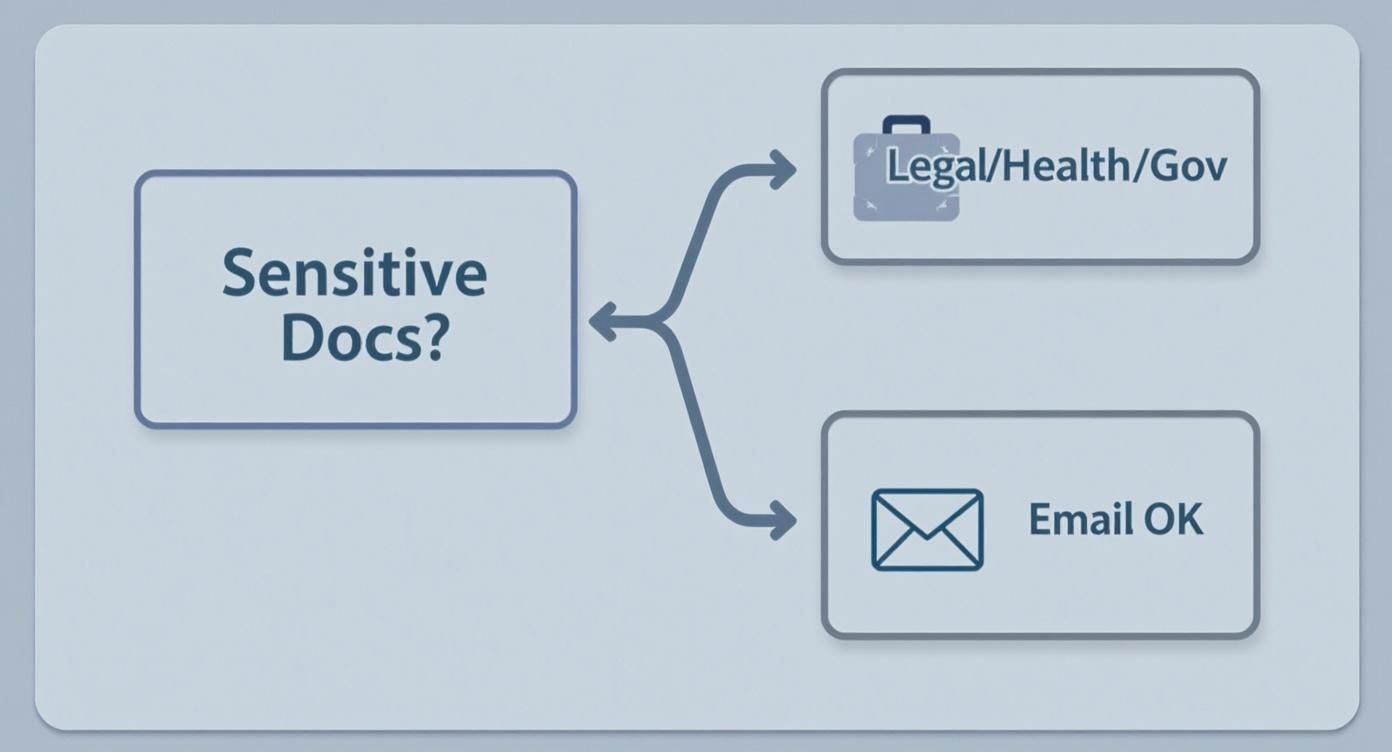
As you can see, for things like legal documents, health records, or government forms, faxing is still a go-to method for its security, often preferred over a standard email.
To make things a bit easier, here’s a quick rundown of the features I’d recommend comparing before you commit.
Comparing Key Features of Free Fax Services
| Feature | What to Look For | Why It Matters |
|---|---|---|
| Page Limits | Check for per-fax and daily caps (e.g., 5 pages/fax, 10 faxes/day). | This is the most common limitation. Exceeding it means your fax won't send or you'll be forced to upgrade. |
| Branding | See if the service adds its own logo or advertising to your cover pages. | Unwanted branding can make your official documents look unprofessional. |
| Security | Look for mentions of SSL/TLS encryption for data transmission. | You need to ensure your sensitive information is protected from interception. |
| No Account Needed | Does it let you send a fax immediately without signing up? | Great for one-off faxes where you don't want to hand over your email and personal info. |
| File Type Support | Verify it accepts PDF, DOC, DOCX, JPG, and other common formats. | Avoids the extra step of having to convert your files before sending. |
Taking a moment to check these details upfront will help you find a reliable service that won't let you down when you're on a deadline.
For a more in-depth analysis of specific providers, our online fax services comparison breaks down the top players in the market. A little bit of research goes a long way in picking the right tool for the job.
Sending Your First Fax From Your Computer
Alright, you've picked a service—now for the fun part. Let's walk through sending your first fax right from your computer. It's much less intimidating than it sounds, and once you get the hang of it, you'll wonder why you ever considered using one of those old, clunky machines.
For this walkthrough, let's pretend we're using a service like SendItFax to send a signed rental application. It’s a common, real-world task that’s perfect for this.
The first thing you need to do is get your document ready. Most online fax services are happiest with PDF files. Why? Because a PDF locks in your formatting, so what you see on your screen is exactly what prints out on the other end. If you have your application saved as a Word document (DOC or DOCX), just go to "File," then "Save As" or "Export," and choose PDF. Easy.
Getting Your File Uploaded and Addressed
Once you have your PDF, head over to the service’s website. You'll usually be greeted by a clean, simple interface. Find the button that says "Upload" or "Attach File" and select the rental application you just saved.
Now comes the most important part: the details. Double-checking your work here can save you a lot of headaches.
- Your Info: Pop in your name and email address. The email is non-negotiable—that's how you'll get the delivery confirmation.
- Recipient Info: This is where you need to be precise. Carefully enter the recipient's name and their full 10-digit fax number. A single wrong number is the number one reason faxes fail to send.
Even though you’re clicking a button on a website, your document is being sent to a machine that probably looks something like this.
Your digital file gets translated into a signal that these traditional machines can read and print out. It's a neat bridge between old and new tech.
Adding a Cover Page and Hitting Send
Most free fax services will either require or automatically add a basic cover page, which is actually pretty helpful. It's your chance to add a quick note. For our rental application, something simple works best.
"Attached is the signed rental application for unit 2B. Please confirm receipt. Thank you."
Think of the cover page as a sticky note. Its job is to tell the person on the other end who you are and what the document is about, not to be a full-blown letter.
After you've filled everything out and given it a final once-over, go ahead and hit "Send." Now the service takes over, converting your file and dialing the number. It can take a couple of minutes, so don’t panic if it’s not instant. Remember, this process is tapping into an infrastructure built decades ago. The number of fax machines in the U.S. rocketed from just 250,000 in 1980 to 5 million by 1990, and today’s online services still rely on that same network. You can discover more insights about the history of fax machines and how they shaped modern communication.
All that's left is to keep an eye on your email. You should get a confirmation message within a few minutes. It will either say "Success!" or let you know if there was a problem, like a busy signal. If you find this process useful, many services also offer a fax to email feature, which streamlines things by letting you manage faxes directly from your inbox.
Know the Trade-Offs: What "Free" Really Means

As handy as free online faxing is, it’s not a magic bullet. It helps to go in with your eyes open. These services run on a "freemium" model—they give you the basics for free, hoping you'll upgrade for more features. Understanding the compromises from the get-go will save you a lot of headaches.
The biggest hurdle you'll run into is almost always the page limit. For example, a typical free service might cap you at three pages per fax and only allow a handful of faxes each day. That’s perfectly fine for zipping over a signed permission slip, but it's a non-starter for a 20-page business proposal.
The Fine Print on Free Tiers
Page counts are just the start. There are a few other common catches you should be aware of before you hit "send" on that time-sensitive document.
- Sending Only: Free plans are a one-way street. You can send faxes out, but you can't receive them. You won't be assigned a fax number for anyone to send documents to you.
- Company Branding: To pay the bills, most free services will tack their logo or a small ad onto your cover page. It’s usually not a big deal, but it might look a bit unprofessional if you're sending a formal application.
- Standard Delivery: Your fax goes into a queue. Paid subscribers often get bumped to the front of the line, so your "urgent" document might have to wait its turn behind theirs.
Here's the bottom line: Free services are fantastic for the occasional, non-critical fax. But if you need to send lots of pages, receive faxes, or guarantee speedy delivery, you’ll want to look at a paid plan.
These limitations aren't there to trick you; it's simply the business model that keeps the basic service free. By knowing what to expect, you can confidently use a free service when it makes sense and recognize when it's time to invest in a low-cost subscription.
How to Troubleshoot Common Faxing Problems
So, you hit send, but your fax didn't go through. It happens. The good news is that most failures are easy to fix, and you don't have to start from scratch.
Your first stop should always be the delivery confirmation email. Most services are great about sending a failure notice that includes an error code or a short explanation. This little clue is usually all you need to figure out what went wrong.
One of the most common messages you'll see is a "busy signal" or "no answer." This is almost never a problem on your end. It simply means the receiving fax machine is tied up, switched off, or maybe even out of paper. Don't panic—just give it 15-20 minutes and try sending it again.
Fixing File and Number Issues
What if the problem is a "file format error?" This usually crops up when you upload a document with complex formatting or layers that the fax service can't quite process. I've found the most reliable fix is to simply re-save your document as a standard PDF. This essentially "flattens" everything into a single, clean image that old-school fax technology can handle.
Here are a couple of other things I always check first:
- Double-Check the Number: A single wrong digit is all it takes for a fax to fail. It's surprisingly easy to do. Always confirm you’ve entered the full 10-digit number correctly, area code and all.
- Simplify Complex Documents: If your file is packed with high-resolution photos or fancy graphics, it might be too large or complex. Try compressing the images or removing non-essential elements before converting it to a PDF.
Remember, the key is to read the failure notice from your email. It tells you exactly what went wrong, turning a frustrating problem into a simple, actionable fix.
By taking a moment to check the number and your file format, you can solve over 90% of the faxing hiccups I've ever run into and get your document where it needs to go.
Your Questions About Free Online Faxing, Answered
When you're trying to send a fax from your computer for the first time, a few questions are bound to pop up. It's totally normal—especially when you’re dealing with important documents. Let's walk through some of the most common things people ask so you can send your files with confidence.
Is It Actually Safe to Send Documents This Way?
This is easily the number one concern I hear. Is it really safe to send a contract or sensitive medical info through a free website? The good news is that reputable services take this very seriously.
They use SSL/TLS encryption to secure your documents from the moment you upload them until they reach the recipient's fax machine. This is the same security protocol that banks and online stores use, so it scrambles your data, making it unreadable to anyone who might try to snoop on it in transit.
Can People Send Faxes Back to Me?
That's a great question, and the answer is almost always no. Free online fax services are typically send-only. They let you send faxes out, but they don't give you a personal fax number to receive them.
Think of it as a one-way street. This is a key difference between free tiers and paid plans, which do provide you with a dedicated number. For one-off sending, it's perfect, but if you need two-way communication, you'll have to upgrade.
Do I Need to Install Any Software?
Nope, and that’s the best part. You don’t have to download a single thing. Forget about clunky software or complicated drivers.
Everything happens right in your web browser. Whether you’re on a Mac, a PC, or even a tablet, the process is the same: visit the website, upload your file, fill in the details, and hit send. It couldn't be simpler.
The Bottom Line: Free online faxing is a secure way to send documents out without installing any software. Just remember that it's designed for sending only—you won't be able to receive faxes. It's the perfect tool for occasional, one-off tasks without any strings attached.
Ready to send a fax in under a minute? With SendItFax, you can send your documents securely right from your browser—no account needed. Try it now at https://senditfax.com and see how easy it is.
Related Posts
What Is a Fax Cover Sheet and Why It Still Matters
Fax Number Lookup: How to Find and Verify Any Fax Number