A Modern Guide to faxing without phone line — explained simply
It might sound a bit old-school, but the need to send a fax hasn't gone away. What has changed is how we do it. You can now send a fax without a phone line by using an online fax service. These services take your digital files—like a PDF or a Word doc—and convert them into a fax format that can be sent over the internet.
This whole process sidesteps the need for a clunky fax machine, a dedicated phone line, and all the supplies that go with it.
Why Faxing Without a Phone Line Is Now Essential
Let's be real: who has a dedicated phone line just for a fax machine anymore? It feels like a relic from another era. And yet, for many industries like healthcare, law, and real estate, faxing is still the gold standard for sending sensitive documents securely. Ditching the old hardware isn't just a nice-to-have; it's a smart move for any modern business looking to be more efficient and cut costs.
The Shift to Digital Efficiency
The best part about faxing without a phone line is just how simple it is. Forget the whole routine of printing a document, walking over to the machine, feeding it in, and dialing. Now, you can send that same document right from your computer or smartphone in a matter of minutes.
By using the internet for transmission, you bypass the old analog phone system entirely. This digital approach comes with some pretty significant perks:
- Real Cost Savings: You can immediately cut the monthly expense of a dedicated phone line, which can easily add 10-15% to overhead for a small business. Plus, you’re no longer paying for paper, ink, or pricey machine repairs.
- Convenience and Mobility: Need to send a contract while on the go? No problem. As long as you have an internet connection, you can send a secure fax from anywhere. This is a huge win for remote workers and anyone who isn't chained to a desk.
- Enhanced Security: Good online fax services use encryption to protect your documents in transit. For sensitive information, this offers a much more secure and trackable option than just attaching it to an email.
To see the difference clearly, here’s a quick breakdown:
Traditional Faxing vs Online Faxing at a Glance
| Feature | Traditional Fax Machine | Online Fax Service (e.g., SendItFax) |
|---|---|---|
| Hardware | Requires a physical machine and phone line | None needed—works on computer, tablet, or phone |
| Location | Tied to the machine's physical location | Send and receive faxes from anywhere with internet |
| Supplies | Needs paper, ink, and toner | Completely digital; no supplies required |
| Cost | Phone line fees, supplies, maintenance | Typically a low subscription or pay-per-use fee |
| Security | Susceptible to being read by anyone near the machine | Encrypted transmission and secure cloud storage |
| Convenience | Manual dialing, busy signals, paper jams | Instant sending, delivery confirmations, no busy signals |
This table really highlights how web-based services have modernized the entire process, turning a chore into a simple digital task.
Market Growth and Modern Adoption
This isn't just a niche trend—it's a full-blown market shift. The fax services market was valued at a whopping $3.46 billion in 2023 and is on track to hit $6.5 billion by 2029. That kind of growth shows just how many people are moving to cloud-based faxing.
This boom is fueled by professionals who need to send important forms and contracts to recipients in the U.S. and Canada instantly, from any device. It’s a need that pay-as-you-go services like SendItFax are perfectly designed to meet. You can find more details on how technology is changing this space in our post on faxing without a landline.
For anyone who has ever wrestled with a paper jam, a busy signal, or that dreaded "out of toner" message, the appeal of online faxing is obvious. It takes an outdated, machine-centric process and turns it into a clean, software-based solution.
At the end of the day, knowing how to fax without a phone line is key to staying efficient. By adopting a modern web-based platform, you get a streamlined, secure, and cost-effective way to handle critical communications—without all the baggage of old technology.
Sending Your First Online Fax in Just a Few Minutes
Forget the clunky old fax machine. Sending a document online without a phone line is incredibly fast and straightforward. There's no complicated software to install or a lengthy sign-up process to navigate; modern services are all about speed and simplicity.
Let's walk through how it works using a clean, web-based service like SendItFax. You'll see just how quickly you can get a document from your screen to a physical fax machine anywhere in the world. The whole thing only takes a few clicks.
First, Get Your Document Ready
Before you do anything else, you need your document in a digital format. For the best, most consistent results, a couple of file types are ideal because they lock in the formatting. This ensures what you send is exactly what your recipient sees on their end.
Your safest bets are:
- PDF (.pdf): This is the gold standard for a reason. PDFs are stable, universal, and keep your formatting perfectly intact—absolutely critical for official forms, signed contracts, or anything where layout matters.
- Microsoft Word (.docx or .doc): Also a solid choice. Just keep in mind that the fax service will convert it to a fax-friendly format, so it’s always smart to give it a quick once-over in a preview window if that option is available.
Got your file saved and ready to go? The hard part is already over.
Next, Plug in the Fax Details
With your document in hand, you just need to tell the service where to send it. A good online fax platform keeps its interface clean and intuitive, so you know exactly what information to enter.
You'll typically see a simple form like this, asking for the basics.
This clean layout gets straight to the point: your details, the recipient's number, and the document itself. Because it's all browser-based, you're not tied to any specific machine—a huge plus of faxing without a phone line.
Here’s what you’ll fill in:
- Sender Info: Your name and email address. That email is crucial—it's where your delivery confirmation receipt will land.
- Recipient Info: The full fax number, including the country and area code. For numbers in the U.S. or Canada, that's just the standard 10-digit number.
- Cover Page Message (Optional): This is a great spot to add a quick note, like "Confidential: For the attention of Jane Smith." It’s the first thing they'll see.
Pro Tip: I can't stress this enough: always double-check the recipient's fax number. A single wrong digit is the number one reason faxes fail to send. Unlike email, you won't get an instant "undeliverable" message if you get it wrong.
Upload Your File and Choose How to Send It
Once the details are filled in, it's time to upload your file. Most services have a simple drag-and-drop box or a button to browse your computer. Just grab that PDF or Word doc you prepared earlier.
This is also where you’ll likely see a choice between a free send and a low-cost priority option. Knowing the trade-offs will help you decide what's right for the situation.
| Feature | Free Send Option | Low-Cost Priority Option |
|---|---|---|
| Cost | $0 | Usually a small fee (e.g., $1.99) |
| Page Limit | Lower (e.g., 3 pages + cover) | Higher (e.g., 25 pages) |
| Branding | May include service branding on the cover | No third-party branding |
| Delivery Speed | Standard queue | Priority queue for faster transmission |
| Cover Page | Usually mandatory | Often optional |
The free option is perfect for a quick, non-urgent document where a small logo on the cover page doesn't matter. But if you're sending a professional contract or a longer report, paying the small fee for priority service is a smart move. It gets your fax to the front of the line and presents a more professional image.
This flexibility is one of the best things about modern faxing. If you want to learn more about the different service features out there, our guide on how to send a fax online is a great resource.
Once you’ve made your choice and attached your file, just hit "Send." The service takes care of all the technical heavy lifting, and you can get back to your day. Just keep an eye on your inbox for that confirmation email.
Choosing the Right Online Faxing Service
So, you know how to fax without a phone line. The next big question is: which service should you actually use? It's easy to assume they're all the same, but that couldn't be further from the truth.
Some platforms are built for the person sending a single form once a year, while others are designed for a busy office that sends a constant stream of documents. Picking the right one means you won't overpay for features you never touch or, worse, hit a frustrating page limit right when you're on a deadline.
The world of online faxing really boils down to three main models. Once you understand these, finding your perfect fit becomes a lot easier.
- Pay-Per-Fax Services: This is your go-to for one-off tasks. If you just need to send a signed contract, a tax form, or some other quick document and don't plan on faxing again for months, this is the way to go. For this exact scenario, services like SendItFax offer an "Almost Free" plan that gets the job done without a subscription.
- Free, Ad-Supported Services: These can work for non-sensitive documents where speed isn't a top priority. The catch? You're usually trading cost for a branded cover page, lower page limits, and your fax getting placed in a standard queue instead of a priority one.
- Monthly Subscriptions: This model is designed for anyone sending faxes regularly. Think of a medical clinic sending patient records, a law firm transmitting case files, or a real estate agency juggling contracts. For them, a subscription is far more cost-effective and comes with the features they need.
This simple decision tree can help you see which path makes the most sense for you.
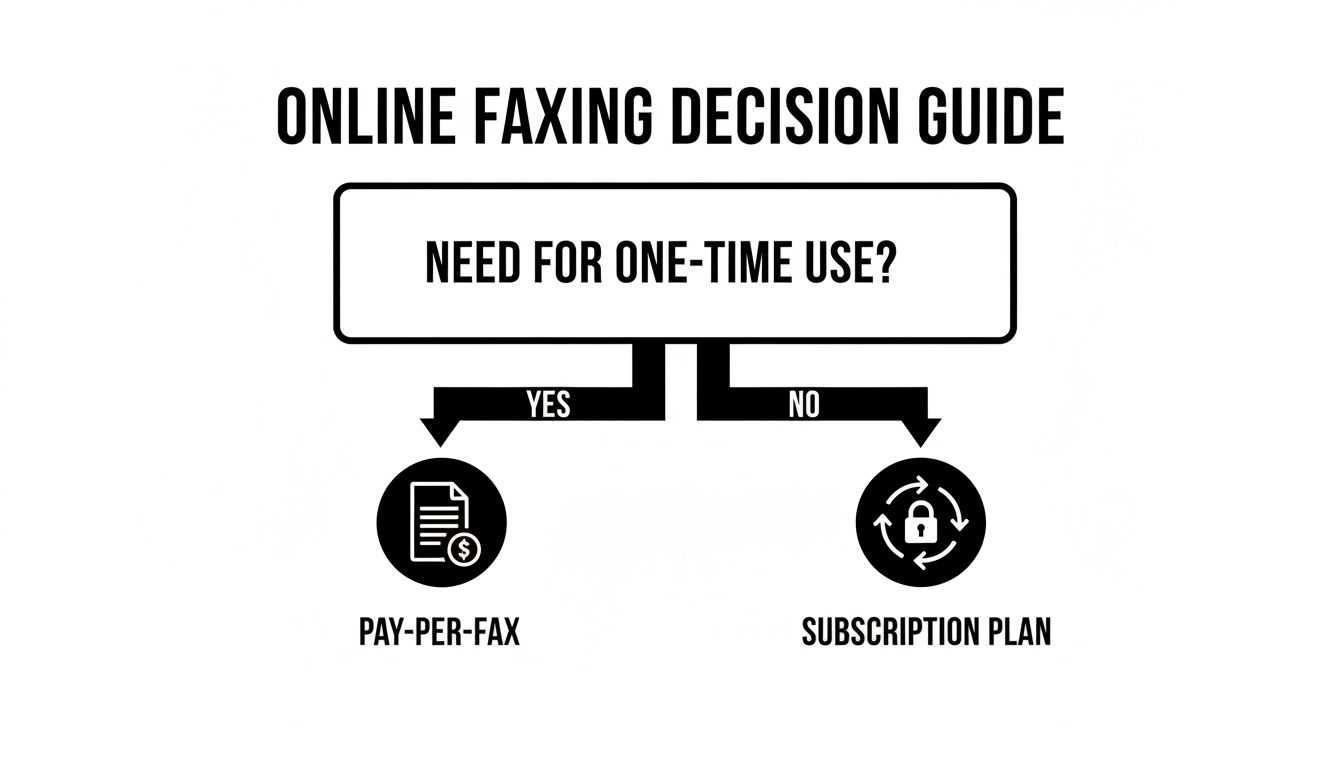
As you can see, it all starts with how often you'll be faxing. If it's not a regular thing, a subscription is probably overkill.
Matching the Service to Your Scenario
Let's put this into a real-world context. A freelance designer who just needs to send a single signed W-9 form to a new client has zero need for a monthly plan. A pay-per-fax service is perfect—it's fast, cheap, and there's no commitment. They can send their document for a few bucks and move on.
Now, consider a small medical practice that faxes patient referrals and insurance pre-authorizations all day. Those per-fax fees would add up in a hurry. A subscription gives them a predictable monthly cost, a much higher page count, and crucial features like HIPAA-compliant security, which is absolutely non-negotiable in their field.
The rise of flexible work has made one-time faxing a surprisingly huge market. It’s all about getting a specific job done without the hassle of a long-term commitment.
The demand for these simple, no-account services is massive. In fact, the one-time fax market exploded to $11.91 billion in 2024 and is on track to more than double by 2033. This boom is being driven by individuals and home offices—a group that makes up a 45% market share—who need to send a few pages instantly without buying any hardware or getting locked into a subscription. You can read the full research on one-time fax market trends to see just how much this has changed the game.
Key Factors to Weigh Before You Choose
Beyond just the pricing model, there are a few other details you'll want to look at. Paying attention to these now can save you a lot of headaches later.
| Feature | What to Look For | Why It Matters |
|---|---|---|
| Page Limits | Check the maximum pages per fax for free vs. paid tiers. | A low limit on a free plan might force you to split documents, which can look unprofessional. |
| Security | Look for mentions of SSL/TLS encryption. | This ensures your data is protected from the moment you upload it until it's delivered. |
| Hidden Fees | Read the fine print for any setup or overage charges. | Some subscriptions have surprisingly low page caps with expensive fees for each additional page. |
| International Options | Confirm which countries are supported if you send faxes globally. | Many simple services, like SendItFax, focus on U.S. and Canadian numbers for reliability. |
By thinking through your own needs and keeping these key factors in mind, you can confidently choose a service for faxing without a phone line that saves you both time and money.
Keeping Your Documents Secure and Compliant
When you're sending something sensitive—think contracts, patient records, or financial statements—security isn't just a nice-to-have feature. It's everything. One of the first questions people ask about faxing without a phone line is, "Is it actually safe?" The short answer is yes, thanks to the technology built into modern online fax services.
Reputable services don't just send your files into the void. They use robust encryption like SSL/TLS, which is the same security protocol that protects your online banking transactions. This creates a secure, private tunnel for your data from the moment you hit "send" all the way to its destination—a massive improvement over a standard, unencrypted email attachment.
Navigating Regulatory Compliance
If you work in healthcare, law, or finance, you know that following industry regulations isn't optional. This is where online faxing really shines, offering clear advantages over both old-school fax machines and standard email. It gives you the control and documentation you need to meet today's demanding standards.
Take healthcare, for instance. Providers in the U.S. live by the rules of the Health Insurance Portability and Accountability Act (HIPAA). In Canada, the Personal Information Protection and Electronic Documents Act (PIPEDA) sets the standard.
These regulations demand things like:
- Secure transmission of all sensitive patient or client data.
- Strict access controls, so only authorized people see the information.
- Detailed audit trails that track every single step of the transmission.
Let's be honest, that clunky fax machine humming away in the office hallway can't deliver that. Documents get left on the tray for anyone to see, they get picked up by the wrong person, or a simple misdial sends private information to a complete stranger. Online faxing is designed to prevent these exact problems. You can learn more about the specifics of online fax security right here on our blog.
Online faxing is more than just sending a file; it's about creating a verifiable, digital paper trail. This audit log confirms who sent the document, when it was sent, and when it was successfully delivered, providing peace of mind and crucial evidence of compliance.
Why It's a More Secure Alternative to Email
Email is quick and easy, but it’s often not secure enough for truly confidential information unless you’re using specialized encryption tools. Online faxing provides a far more secure and compliant channel right out of the box.
This is especially true in North America, which has become the global leader in online fax adoption, driven largely by healthcare's need for compliant communication under regulations like HIPAA.
Healthcare providers in the U.S. and Canada—the regions SendItFax primarily serves—send millions of patient forms this way every year to comply with data protection laws. Because email is just too risky for many legal or real estate documents, online faxing remains a key tool for 17% of businesses worldwide. It fills a critical security gap that email leaves wide open. You can discover more insights about the online fax market and see why it’s growing in regulated fields.
At the end of the day, choosing a modern fax service isn't just about convenience—it's about handling sensitive information with the responsibility it deserves.
Troubleshooting Common Online Faxing Problems
Even the most reliable web-based fax service can hit a snag now and then. But don't worry—most of the time, the fix is surprisingly simple and comes down to just a handful of common culprits. When a fax fails, a quick check of the basics will almost always get you back on track.
Before you dive into complex troubleshooting, start with the most common mistake in the book: the recipient's fax number. It happens to everyone. A single mistyped digit is all it takes to send your document into the void. Always take a second to double-check that you've entered the complete 10-digit number correctly, especially for faxes going to the U.S. and Canada.
Another frequent reason for a failed fax is a busy signal. It’s an old-school problem that still exists in the digital world. Unlike email, which just waits in an inbox, a fax needs an open, dedicated line to make the connection. If the recipient's machine is already sending or receiving another document, your fax will have to wait.
Diagnosing Upload and Quality Issues
Sometimes the issue isn't on the receiving end at all; it's with the document you're trying to send. If you can't even get your file to upload, the first things to check are its format and size. Services like SendItFax are optimized for standard file types like PDF, DOC, or DOCX. Trying to upload an obscure format or a file that’s too large will usually trigger an error message.
The quality of your source document is also a massive factor. A blurry, low-resolution scan or a document with faint text might look okay on your screen, but it can turn into an illegible mess after being converted and transmitted.
To make sure your faxes arrive looking clean and professional, I always recommend a few best practices:
- Create High-Contrast Scans: Make sure your text is crisp and dark against a clean, white background. Any shadows or smudges will only get worse.
- Use Simple, Standard Fonts: Stick with classics like Arial or Times New Roman. They transmit much more clearly than fancy, decorative fonts.
- Convert to PDF First: This is my go-to tip. Saving your document as a PDF locks in the formatting and prevents any weird conversion issues from popping up.
Don't forget, your delivery confirmation email is your best friend for troubleshooting. A "Success" status is your proof of transmission. But if you see "Failed," look for the reason—codes like "No Answer" or "Busy" tell you exactly what happened and what to do next.
By working through these potential issues one by one—the number, the recipient's line, and your document's quality—you can solve nearly any online faxing problem you encounter. It’s all about being methodical.
Common Questions About Faxing Without a Phone Line
Even with all the steps laid out, a few practical questions almost always pop up. I get these all the time from people new to online faxing. Let's run through the most common ones to clear up any lingering doubts before you send your first document.
Do I really need my own fax number just to send something?
Nope, and that's one of the best parts about pay-per-fax services. If you just need to fire off a document once in a while, a service like SendItFax lets you use their platform to handle the transmission. You don't need to sign up for or manage your own number. All you do is provide your email, which is how they send you the all-important delivery confirmation.
Now, if you plan on receiving faxes, that’s a different story. For that, you’ll absolutely need a dedicated fax number from a subscription service. But just for sending? You’re good to go without one.
Can I actually send a fax from my phone?
You sure can. Modern online faxing is just a website, so anything with a browser works—your iPhone, an Android tablet, you name it. There's no special app you have to hunt down and install.
Just pull up the service’s website on your phone. You can upload a file directly from your device’s storage or a cloud drive like Google Drive, punch in the recipient's fax number, and hit send. It’s a lifesaver when you're on the road and need to get a signed contract back to the office immediately.
The real beauty of faxing without a phone line is that you're no longer tied to a specific machine or location. Whether you're at your desk or waiting for a flight, the process is exactly the same.
What’s the best file type to use for faxing?
Good question. While most platforms are pretty flexible, a few file formats consistently deliver the best results. If you want to make sure your document looks perfect on the other end, I’d stick with these.
- PDF (.pdf): This is the gold standard, hands down. A PDF locks everything in place—fonts, images, formatting. It’s the safest bet for anything where the layout is critical, like legal documents or government forms.
- Microsoft Word (.docx): Very common and almost always works without a hitch. The service will convert it to a fax-friendly format for you behind the scenes.
- Image Files (.jpg, .png): Perfect for sending things like photos, sketches, or scanned receipts. Just make sure the image is high-resolution, or it might look fuzzy and unreadable after it’s transmitted.
How do I know if the fax actually went through?
This is where online services truly outshine old-school fax machines. The moment your transmission is complete, the service emails you a delivery confirmation receipt. This little digital document is your proof that it was sent.
Typically, it includes everything you need to know:
- The exact date and time it was sent
- The fax number you sent it to
- A page count
- A clear status: "Success" or "Failed"
If it fails, the receipt usually gives you a reason—like "Busy Signal" or "No Answer"—so you're not left guessing. This creates a reliable paper trail, which is absolutely essential for business and legal correspondence.
Ready to send your first fax without the hassle of a phone line? With SendItFax, you can send your documents securely in minutes from any device. Try our simple pay-as-you-go service today.
Related Posts
Fax Cover Sheet to IRS: How to Send It Right
MS Office Fax Cover Sheet Template: Create and Customize