7 Professional Fax Cover Example Templates for 2026
Despite its vintage reputation, faxing remains a critical communication tool in industries like healthcare, law, and real estate where security and verification are paramount. Sending a fax without a proper cover sheet is like sending a professional email with no subject line or signature; it's unprofessional and creates unnecessary work for the recipient. A well-crafted cover sheet isn't just a formality, it’s a functional tool that ensures your document is routed correctly, understood immediately, and handled with the appropriate level of confidentiality.
This guide provides a strategic breakdown of seven top-tier destinations for finding the perfect fax cover example for any situation. We move beyond simple links, offering a detailed analysis of templates from platforms like SendItFax, Microsoft Create, and Adobe Acrobat. Each example is dissected to reveal its strengths, ideal use cases, and actionable customization tips. You will learn not just what to include, but why specific elements matter.
Every effective fax cover sheet must contain core information: sender and recipient details, date, subject, and a total page count (including the cover). However, the best examples go further, incorporating fields for urgent notices or critical confidentiality disclaimers required by regulations like HIPAA. This curated list will help you select and customize a professional template that protects your information and ensures your message is received clearly and professionally. For those seeking an all-in-one solution, we’ll highlight how services like SendItFax integrate these essential features directly, simplifying the entire process from creation to transmission.
1. SendItFax
SendItFax stands out as a premier choice for users seeking a fast, secure, and remarkably accessible online faxing solution. Its browser-based platform is engineered for efficiency, eliminating the need for account creation, software installation, or a physical fax machine. This makes it an ideal tool for professionals and individuals who need to send occasional or time-sensitive documents to destinations within the U.S. and Canada. The service excels by offering a genuinely free tier alongside a transparent, low-cost paid option, catering to a wide spectrum of faxing needs.
The platform's core strength lies in its "no-signup" convenience. For users needing to send a quick document, the free service is unparalleled. You can upload a DOC, DOCX, or PDF file, add a brief cover message, and transmit up to three pages (plus a cover sheet) instantly. This is a perfect fax cover example of a streamlined workflow for urgent needs like sending a signed contract, submitting a form, or providing documentation without any upfront commitment.
In-Depth Analysis of Key Features
SendItFax’s feature set is intentionally focused on the core task of sending faxes reliably and easily.
- Dual-Tier System: The service masterfully balances accessibility with professional needs. The free tier is perfect for personal use or very small jobs, while the "Almost Free" paid option provides a significant upgrade for just $1.99 per fax. This paid tier removes all SendItFax branding, increases the page limit to 25, and provides priority delivery, making it suitable for sensitive business, legal, or medical documents.
- Universal Accessibility: Operating entirely within a web browser, SendItFax works seamlessly across desktops, laptops, tablets, and smartphones. This flexibility is critical for remote workers, travelers, or anyone away from a traditional office setup.
- Robust Document Support: The platform accepts the most common document formats (PDF, DOC, DOCX), covering the vast majority of business and personal document needs. This avoids the hassle of file conversion before sending.
- Transparent Delivery Tracking: A common pain point with faxing is uncertainty. SendItFax provides clear delivery confirmations and tracking, giving users peace of mind that their documents have been successfully received. This reliability is frequently cited in its overwhelmingly positive user reviews (4.8/5 from over 250+).
Strategic Breakdown and Use Cases
The strategic advantage of SendItFax is its focus on the "one-off" user, a segment often neglected by subscription-based services.
Key Insight: By removing the registration barrier, SendItFax captures users at their precise moment of need. This frictionless experience builds trust and makes the affordable paid option an easy choice for subsequent, more demanding tasks.
Practical Applications:
- Healthcare: Medical offices can securely transmit patient records or referrals. For those handling sensitive information, understanding best practices is key; you can explore this further by reading about how to create a HIPAA-compliant fax cover sheet.
- Legal & Real Estate: Attorneys and agents can send time-sensitive contracts, agreements, and official forms with verified delivery confirmation.
- Small Businesses & Freelancers: Sending invoices, purchase orders, or project agreements is quick and professional with the branding-free paid option.
- Personal Use: Ideal for submitting government forms (like IRS documents), applications, or personal records without needing to find a public fax machine.
Final Assessment
SendItFax distinguishes itself with a user-centric design that prioritizes speed, simplicity, and transparency. While not built for high-volume, two-way faxing that requires a dedicated number, it is an exceptional solution for its target audience.
Pros:
- No account or registration required for the free tier.
- Clear, low-cost paid option ($1.99) for up to 25 pages and no branding.
- Fast, browser-based workflow with reliable delivery confirmation.
- Highly trusted, with strong reviews from professional users.
Cons:
- Free tier includes branding and is limited to 3 pages (plus cover).
- Lacks features for high-volume users, such as inbound faxing or account management.
- Service is limited to U.S. and Canadian fax numbers.
For anyone in need of a dependable, straightforward, and modern way to send a fax, SendItFax is a definitive and highly recommended starting point.
Website: https://senditfax.com
2. Microsoft Create (official Microsoft templates)
Microsoft Create stands as a powerful and familiar resource for professionals who live within the Microsoft Office ecosystem. Rather than offering a web-based editor or PDF downloads, it provides a curated gallery of free, professionally designed fax cover sheet templates that open directly in Microsoft Word, either on the desktop or via the free web app. This makes it an ideal choice for users who value a seamless, offline-friendly editing experience.
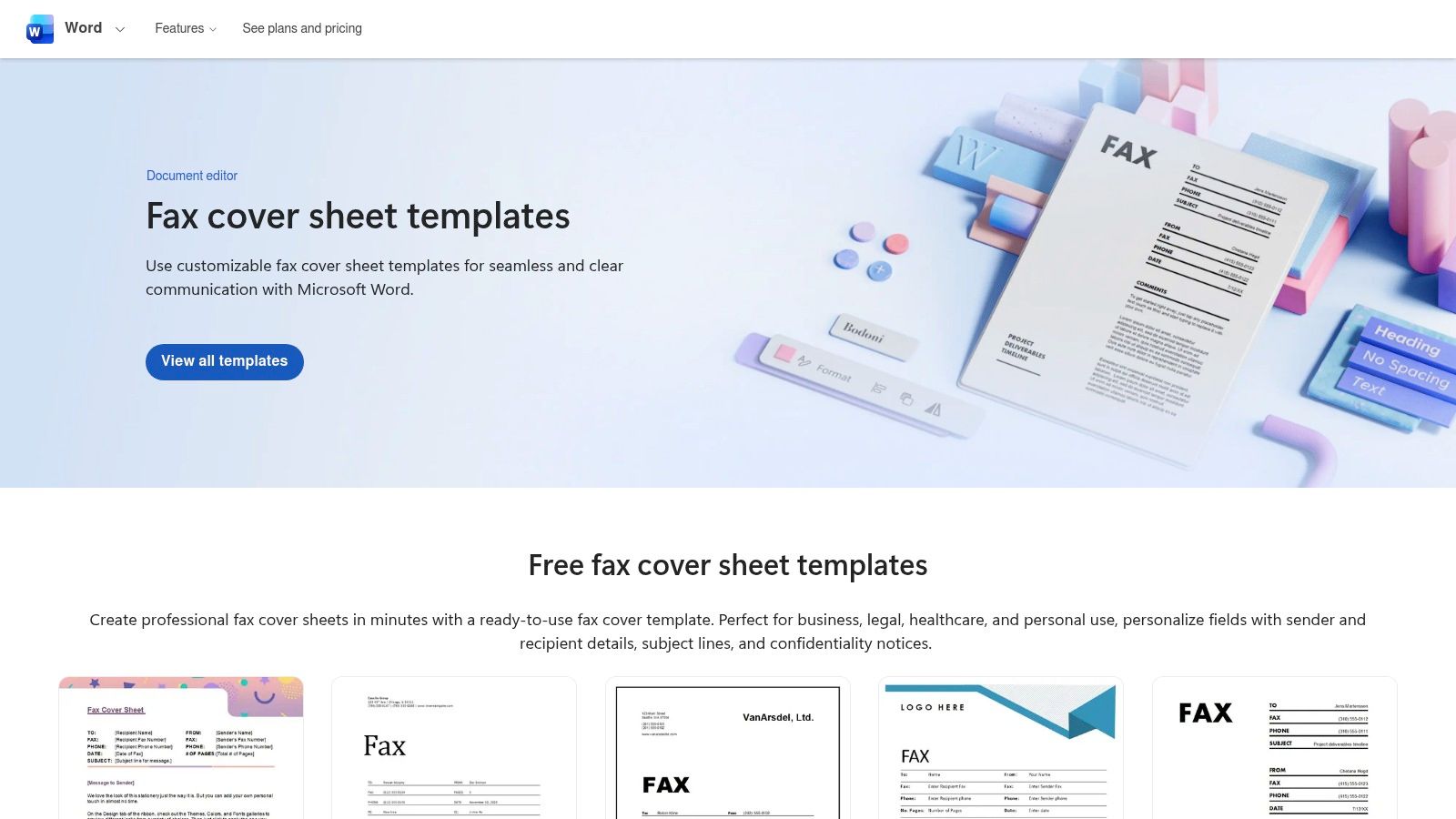
The platform’s primary advantage is its direct integration with Word. Users can browse templates, click to open their favorite, and immediately start customizing it using tools they already know. This eliminates any learning curve and allows for deep customization, from inserting a high-resolution company logo to adjusting fonts and color schemes to match brand guidelines.
Strategic Analysis of Microsoft Create
Microsoft’s templates are built for reliability and professionalism. Each fax cover example includes essential fields like sender and recipient information, date, subject line, and the total number of pages. The designs range from minimalist and traditional to modern and colorful, catering to various corporate aesthetics.
Key Takeaway: The strength of Microsoft Create is its reliance on the robust editing capabilities of Word. Users are not limited by a restrictive web editor; they have the full power of a word processor to craft a perfect fax cover sheet.
This platform is particularly beneficial for creating a standardized company-wide template. An administrator can download a base template, add the company logo and contact details, and distribute the .docx file for team use. This ensures consistency and professionalism across all outgoing faxes.
How to Get the Most Out of Microsoft Create
Using these templates effectively is straightforward. For optimal results, follow these steps:
- Select a Base Design: Choose a template that aligns with your company's branding. A simple, clean design is often more professional than an overly elaborate one.
- Customize in Word: Open the template and immediately replace the placeholder logo with your own. Update the "From" section with your permanent contact information.
- Save as a Reusable Template: Instead of saving it as a standard document, save the file as a Word Template (
.dotx). This creates a master copy that you can open anytime to generate a new, blank fax cover sheet without overwriting your original. - Pair with Digital Faxing: Once your cover sheet is filled out, you can save it as a PDF and attach it to an online fax service like SendItFax. This combines the high-quality document creation of Word with the convenience of modern, machine-free faxing.
While the selection is less extensive than dedicated template marketplaces, the quality and ease of use are top-tier. For those looking to understand the nuances of what to include in the comments section, our guide on crafting an effective fax cover letter provides detailed best practices.
Website: Microsoft Create Fax Cover Pages
3. Adobe Acrobat (Acrobat Hub)
Adobe, the company synonymous with the PDF format, offers an authoritative and practical resource through its Acrobat Hub. Instead of a large gallery, Adobe provides a detailed how-to guide complemented by a single, free, and universally compatible fax cover sheet template. This approach is perfect for users who want to not only download a reliable file but also understand the best practices for creating and managing fax documents in a digital workflow.
The primary advantage of this resource is its focus on workflow integrity. Adobe guides users through the process of including essential fields, editing the template in either Word or directly as a PDF, and saving the final document to ensure its formatting remains intact across all devices and printers. This makes it an excellent choice for professionals who value precision and consistency in their documentation.
Strategic Analysis of Adobe Acrobat
Adobe’s offering is less about variety and more about process and reliability. The provided fax cover example is clean, professional, and includes all necessary components like sender/recipient details, a subject line, page count, and a confidentiality notice. The true value lies in the accompanying guidance, which leverages Adobe's expertise in document management.
Key Takeaway: Adobe's strength is in empowering users with a reliable workflow. By providing a template alongside best practices for PDF conversion, it ensures the final fax cover sheet looks exactly as intended, free from the formatting issues that can plague other file types.
This platform is especially useful for those who frequently work with PDFs and may already use Adobe Acrobat. The ability to edit the template directly within Acrobat (using its form-filling or editing features) and then seamlessly combine it with other documents before faxing creates a streamlined and efficient process.
How to Get the Most Out of Adobe Acrobat
Using Adobe's resource is about more than just downloading a file; it's about adopting a professional document standard.
- Download the Template: Start by downloading the free template directly from the Acrobat Hub page.
- Choose Your Editor: Decide whether to customize it in Microsoft Word for easy text entry or open it in Adobe Acrobat for direct PDF editing and form filling.
- Add Static Information: Fill in your company name, logo, and contact information. If you plan to reuse it, save this version as your master template.
- Save as a Final PDF: Once you have filled in the details for a specific fax, always save the final version as a PDF. This locks in the formatting and makes it easy to attach to an online fax service like SendItFax, ensuring professional delivery every time.
While it only offers a single template, the quality and expert guidance make it a standout resource. For those looking for more variety, our comprehensive guide on the best cover sheet template options can provide additional choices.
Website: Adobe Acrobat Hub Fax Cover Sheet Template
4. eFax (cover sheet template library)
eFax, a major player in the online faxing industry, offers an extensive and well-organized library of free, downloadable fax cover sheet templates. Rather than focusing on a single design style, the platform provides a wide array of options categorized by industry and use case, such as HIPAA-compliant medical forms, professional business layouts, and simple personal templates. This makes it an invaluable resource for users seeking a specific fax cover example tailored to their unique needs.

The primary advantage of the eFax library is its sheer breadth and specificity. Users can quickly find a template that already contains the necessary fields and disclaimers for their industry, saving significant time and reducing the risk of compliance errors. Each template is available as a simple, one-click PDF download, ready to be printed and filled out or attached directly to an online fax.
Strategic Analysis of eFax
eFax’s template collection is strategically designed to guide users toward best practices. For instance, the HIPAA-compliant templates include a pre-written confidentiality notice, a critical component for healthcare communications. The designs range from modern and minimalist to traditional and formal, ensuring a suitable option for any professional context. The site also provides practical guidance on cover sheet etiquette and privacy considerations.
Key Takeaway: The strength of eFax lies in its categorical organization. By providing industry-specific templates (like healthcare and legal), it helps users meet compliance standards and professional expectations without needing to create a document from scratch.
While the site naturally promotes the eFax service, the templates themselves are universally usable and free for anyone to download. This positions eFax as a helpful authority in the faxing space, providing value even to non-customers. The clear instructions on how to use these sheets with online fax services make them highly practical.
How to Get the Most Out of eFax
Leveraging these purpose-built templates is a straightforward process. Follow these steps for the best results:
- Browse by Category: Instead of looking for a generic design, start by navigating to the category that best fits your needs (e.g., Simple, Medical, Business).
- Download and Prepare: Download your chosen PDF template. You can either print it to fill it out by hand or use a PDF editor to type your information directly into the fields.
- Ensure All Fields Are Complete: Double-check that all essential information is included, such as recipient and sender details, the date, and the total number of pages (including the cover sheet).
- Attach to Your Online Fax: When using an online fax service like SendItFax, simply upload your completed cover sheet as the first page of your document. This combines the targeted design of the eFax template with the efficiency of digital faxing.
The variety offered by eFax is one of its strongest selling points. For those in specialized fields requiring specific language or layouts, this library is an excellent starting point for creating a compliant and professional fax cover example.
Website: eFax Fax Cover Sheets
5. iFax (template hub)
iFax provides a comprehensive template hub that bridges the gap between static PDFs and fully customizable documents. It offers a wide selection of free, downloadable fax cover templates available in both DOC and PDF formats. This dual-format offering makes it a flexible choice for users who either want a quick, print-ready sheet or a file they can deeply customize in Microsoft Word or other word processors.
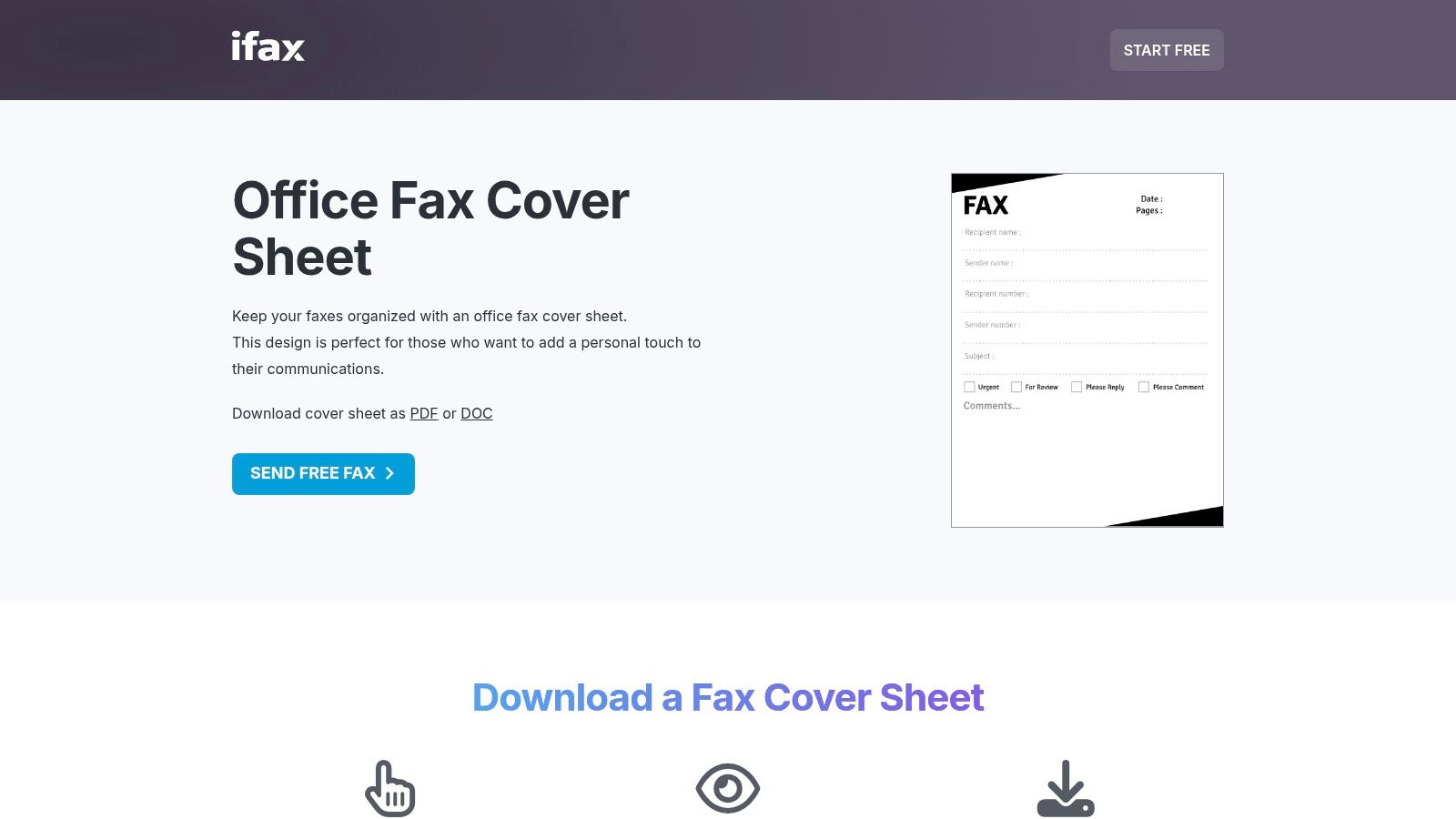
The platform’s core strength lies in its variety and accessibility. Users can browse categories like Office, Modern, Personal, and even specialized HIPAA-compliant designs without needing to sign up or create an account. Each template page features a clear preview, a brief description of its intended use, and direct download links, streamlining the process of finding and acquiring the right fax cover example.
Strategic Analysis of iFax
iFax’s templates are designed for practical application, providing a solid foundation for both professional and casual faxing needs. The inclusion of DOC files is a significant advantage, empowering users to move beyond simple form-filling and fully integrate their own branding, such as logos and company color schemes. The designs are clean, functional, and include all necessary fields.
Key Takeaway: By offering templates in DOC format, iFax caters directly to users who prioritize customization and brand consistency. It provides the raw materials to create a reusable, professional template within a familiar editing environment like Microsoft Word.
While the site does promote the iFax digital faxing service, the templates themselves are freely accessible and platform-agnostic. The navigation can occasionally feel segmented due to the numerous subpages for different template styles, but the clear categorization helps users quickly narrow down their search.
How to Get the Most Out of iFax
To leverage the iFax template hub effectively, consider these steps:
- Choose Your Format Wisely: If you just need a quick, one-off cover sheet, the PDF version is perfect for printing and filling out by hand. For recurring use, always download the DOC file.
- Create a Master Branded Template: Open the DOC file in Microsoft Word. Immediately insert your company logo and populate the sender fields with your standard information (name, company, address, phone).
- Adjust the Layout: Use Word’s editing tools to adjust fonts and colors to match your brand guidelines. You can even move or resize fields to better suit your needs.
- Save as a
.dotxFile: To prevent accidental overwrites, save your customized version as a Word Template (.dotx). This allows you to generate a fresh, pre-filled cover sheet for every new fax you send. - Prepare for Digital Faxing: Once your cover sheet is complete, save it as a PDF. This file can then be easily uploaded as the first page of your document when using an online fax service like SendItFax, ensuring a professional presentation every time.
Website: iFax Office Fax Cover Sheet
6. Template.net
Template.net operates as a massive online marketplace for document templates, and its collection of fax cover sheets is impressively diverse. The platform stands out by offering a vast catalog of designs in multiple file formats, including Word, Google Docs, PDF, and Apple Pages. This flexibility makes it a one-stop shop for users across different operating systems and software preferences, from individual users to large organizations.
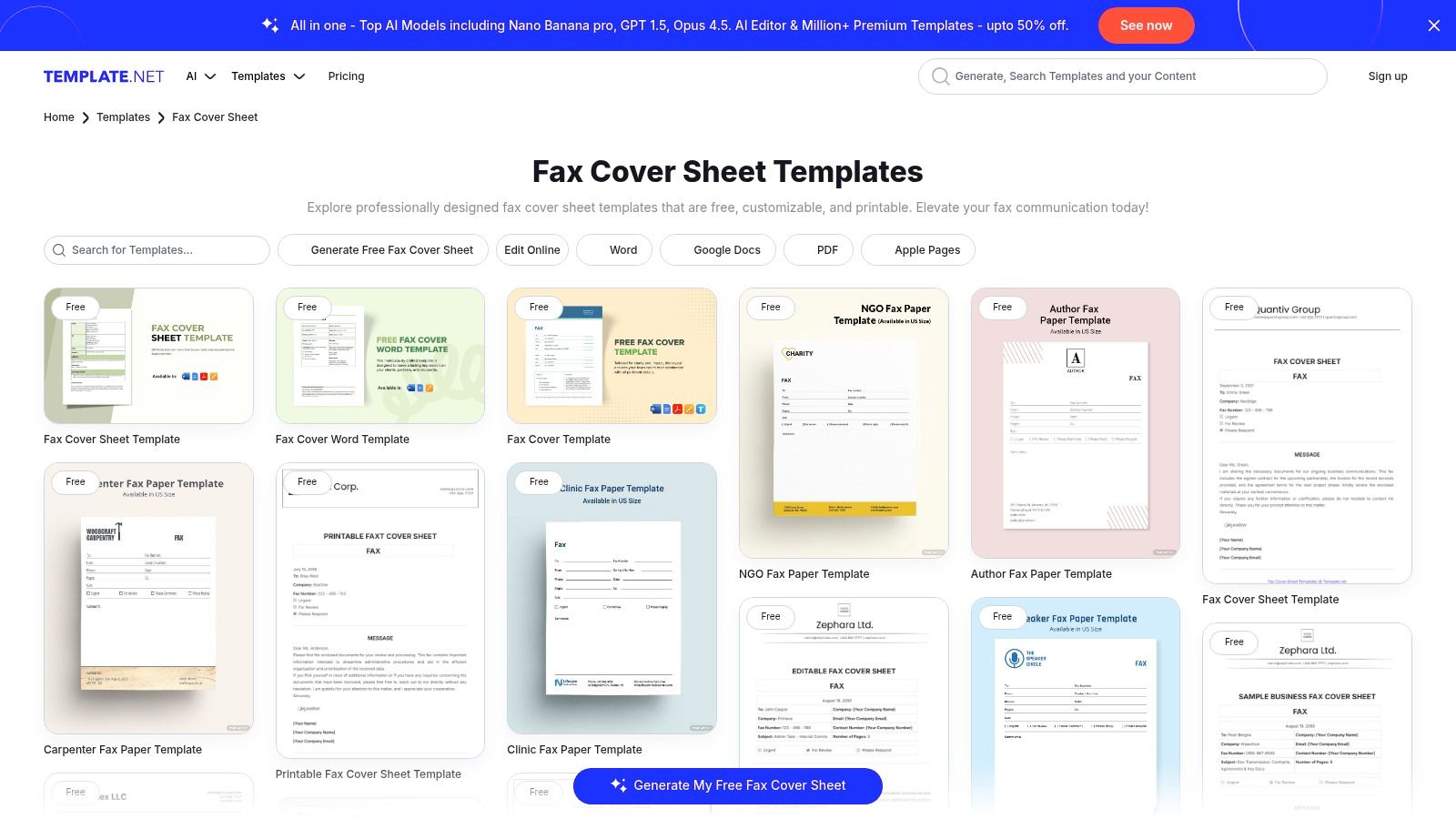
The primary strength of Template.net is its sheer volume and variety. Users can find everything from minimalist and personal designs to highly specific, professional templates for law firms, medical offices, and real estate agencies. The platform also features an in-browser editor and an AI fax sheet generator, providing modern tools for users who prefer to create and edit directly online without downloading software.
Strategic Analysis of Template.net
Template.net’s strategy is built on catering to every possible niche. By offering specialized templates, such as a “Confidential Fax Cover Sheet” or a “Medical Fax Cover Sheet,” it directly addresses the compliance and professional needs of specific industries. Each fax cover example is designed with the appropriate fields and disclaimers, saving users from having to create these critical elements from scratch.
Key Takeaway: The platform’s greatest asset is its format diversity and niche specialization. Whether you need a simple fax cover example in Google Docs or a complex legal template in Word, Template.net likely has a pre-built solution ready to download.
While many templates are free, the best and most specialized designs often require a premium subscription. This freemium model allows users to test the platform's offerings before committing, but businesses needing consistent access to high-quality or unique templates will find the paid plan more practical. The quality can vary, so it's wise to preview templates carefully.
How to Get the Most Out of Template.net
To use this extensive resource efficiently, consider the following approach:
- Use Filters to Narrow Your Search: Start by using the search and filter functions to find templates by format (e.g., "Word," "Google Docs") or by industry (e.g., "legal," "medical") to quickly locate relevant options.
- Choose the Right Format: Select the format you are most comfortable editing. If you collaborate with a team on Google Workspace, a Google Docs template is ideal. For offline editing and deep customization, a Word file (
.docx) is a better choice. - Customize with Essential Branding: Once downloaded, immediately add your company logo, contact information, and any standard legal disclaimers your industry requires. Save this customized version as your master template.
- Integrate with Your Faxing Workflow: After filling out your cover sheet for a specific transmission, save the final document as a PDF. This ensures universal compatibility when you upload it to an online fax service like SendItFax, creating a seamless and professional faxing process.
Website: Template.net Fax Cover Sheet
7. Etsy
Etsy is an unexpected but powerful resource for finding a high-quality, uniquely styled fax cover example. As a marketplace for independent creators, it offers a vast collection of low-cost, downloadable fax cover sheet templates. These are perfect for businesses and individuals who want their correspondence to reflect a specific brand aesthetic, from modern and minimalist to creative and colorful, going far beyond standard corporate designs.
Unlike free template galleries, Etsy focuses on one-off purchases for professionally designed digital files. Most templates are offered as either fillable PDFs or, more commonly, editable Canva templates. This allows for easy customization of colors, fonts, and layouts using a free and intuitive online design tool, giving users professional results without needing graphic design skills.
Strategic Analysis of Etsy
Etsy’s primary advantage is aesthetic variety and the ability to find a fax cover sheet that perfectly matches your brand identity. The templates are crafted by professional designers, often resulting in a more polished and modern look than what is typically available from free sources. The immediate digital download means you can purchase and customize your template within minutes.
Key Takeaway: Etsy excels at providing unique, brand-aligned fax cover sheets for a minimal one-time cost. It's the ideal choice for businesses that want every piece of communication, including a fax cover, to be visually consistent and professionally designed.
The platform's review and rating system provides a crucial quality check. Users can see feedback from previous buyers to gauge the quality of a template and the helpfulness of the seller before making a purchase. This helps mitigate the risk of a poor-quality file, which can be a concern on a marketplace with many different vendors.
How to Get the Most Out of Etsy
To leverage Etsy effectively for your fax cover needs, follow this simple process:
- Search with Specific Keywords: Use search terms like "professional fax cover," "minimalist fax cover sheet," or "medical fax template" to narrow down the vast selection to designs that fit your industry and style.
- Check File Compatibility: Carefully read the item description to confirm the file type. Ensure it is a fillable PDF or an editable Canva template, depending on your preference and technical comfort.
- Read Seller Reviews: Prioritize templates from sellers with high ratings and positive reviews. Look for comments that mention ease of use and the quality of the final document.
- Customize and Save: Once purchased, follow the seller’s instructions to edit your template. Add your company logo, input your permanent contact details, and save a master version. You can then create new copies for each fax you send, combining a unique design with the efficiency of an online fax service.
For professionals in fields like real estate, a branded fax cover from Etsy can add a touch of personalization that sets them apart. To learn more about the specific fields required, our guide on a real estate fax cover sheet provides a detailed checklist.
Website: Etsy Fax Cover Sheet Templates
Top 7 Fax Cover Template Comparison
| Solution | Complexity 🔄 | Resources ⚡ | Expected outcomes 📊⭐ | Ideal use cases 💡 | Key advantages ⭐ |
|---|---|---|---|---|---|
| SendItFax | Very low — browser-only, no install or account 🔄 | Minimal — internet + device; pay-per-fax for larger jobs ⚡ | Fast delivery and reliable tracking; free tier limited pages 📊⭐️⭐️⭐️ | Emergency or one-off faxes; small orgs needing quick US/Canada delivery 💡 | No-signup free sends; low per-fax option; priority delivery available ⭐ |
| Microsoft Create (official templates) | Low — open/edit in Word (web or desktop) 🔄 | Moderate — Microsoft account recommended; Word app ⚡ | Consistent, printable templates for office workflows 📊⭐️⭐️ | Office/Word users who print or edit familiar templates 💡 | Free first-party templates; familiar Word workflow; no third-party ads ⭐ |
| Adobe Acrobat (Acrobat Hub) | Low–Medium — download + follow how-to steps 🔄 | Moderate — PDF/Word editor; Acrobat for advanced edits ⚡ | High-fidelity PDF templates and formatting guidance; single sample focus 📊⭐️ | Users needing PDF fidelity and best-practice guidance for printing 💡 | Authoritative guidance, checklist, and PDF-ready template ⭐ |
| eFax (cover sheet library) | Low — browse categorized library and download 🔄 | Minimal — web access; optional eFax account ⚡ | Broad category coverage with easy downloads; geared to many industries 📊⭐️⭐️ | Quickly finding industry-specific templates (HIPAA, legal, etc.) 💡 | Largest categorized template set and practical usage tips ⭐ |
| iFax (template hub) | Low — preview and download DOC/PDF templates 🔄 | Minimal — web access; DOC/PDF editable files ⚡ | Editable DOC options with previews; good variety for business/personal 📊⭐️⭐️ | Users preferring editable Word files or quick previews before download 💡 | DOC+PDF formats, preview thumbnails, Word-editable templates ⭐ |
| Template.net | Medium — search, edit in-browser or download 🔄 | Higher — mixed free/paid plans; editor and multiple formats ⚡ | Very versatile selection and niche templates; quality varies 📊⭐️⭐️⭐️ | Need many formats, niche industry sheets, or in-browser editing/AI generation 💡 | Huge catalog, multi-format support, in-browser editor and AI tools ⭐ |
| Etsy | Low — purchase and download seller templates 🔄 | Minimal — small purchase cost; downloadable files (Canva/PDF) ⚡ | Unique, styled designs; quality and licensing vary across sellers 📊⭐️ | Branded or aesthetic one-off covers; designers’ custom styles 💡 | Affordable unique aesthetics, Canva-ready files, clear previews/reviews ⭐ |
Final Thoughts
Navigating the landscape of fax communication in a digital-first world can feel like a paradox, yet it remains a critical process in many professional sectors. Throughout this guide, we've dissected a wide array of fax cover example resources, moving from dynamic online faxing platforms like SendItFax and eFax to robust template libraries from Microsoft, Adobe, and Template.net. The core lesson is clear: a fax cover sheet is far more than a simple introductory page. It is a strategic tool for establishing professionalism, ensuring compliance, and guaranteeing your document reaches its intended recipient without delay or confusion.
Each tool and template source we explored offers a unique value proposition. Your ideal choice hinges entirely on your specific context, frequency of use, and professional requirements. The key is to move beyond a one-size-fits-all mentality and adopt a more strategic approach to document transmission.
Key Takeaways and Strategic Insights
As you prepare to send your next fax, remember these crucial strategic points derived from our analysis:
- Context is King: The most effective fax cover example is one that is perfectly tailored to its purpose. A legal cover sheet requires strict confidentiality disclaimers that would be unnecessary for a personal fax. A healthcare fax demands HIPAA compliance language, while a real estate transmission prioritizes property and transaction details. Always start by defining the "why" behind your fax.
- Clarity Over Complexity: While customization is valuable, the primary function of a cover sheet is to convey essential information quickly. Prioritize legibility and a logical flow of information. Use clear headings, ample white space, and a professional font to ensure the recipient can identify the sender, recipient, and subject matter at a single glance.
- Compliance is Non-Negotiable: For industries like healthcare and legal, compliance isn't just a best practice; it's a legal requirement. Failure to include necessary disclaimers (like a HIPAA confidentiality notice) can have serious consequences. Always use templates that are specifically designed for your industry to mitigate risk and demonstrate due diligence.
- Branding Reinforces Professionalism: For businesses, freelancers, and organizations, a branded fax cover sheet is a simple yet powerful tool for reinforcing your professional image. Integrating your logo and consistent brand colors elevates your communication from a simple transmission to a professional correspondence.
Your Actionable Next Steps
With this knowledge in hand, your path forward is straightforward. The goal is to select a tool that not only provides a suitable fax cover example but also streamlines your entire workflow.
- Assess Your Needs: Determine your faxing frequency, industry requirements (e.g., HIPAA), and budget. Are you an individual sending a one-off document, or a small business needing a reliable, branded solution?
- Select Your Tool:
- For quick, no-cost, browser-based faxing with integrated cover sheets, an online service like SendItFax is the most efficient choice.
- For users already invested in the Microsoft or Adobe ecosystems, leveraging their template libraries (Microsoft Create, Adobe Acrobat Hub) is a logical and cost-effective starting point.
- For those needing a high volume of diverse templates for various projects, a dedicated resource like Template.net can be invaluable.
- Customize and Save Your Template: Once you've chosen a platform, take a few moments to customize your primary cover sheet. Fill in your standard contact information, add your logo if applicable, and refine any boilerplate text. Save this master template to make future faxing a matter of seconds, not minutes. By operationalizing your process, you ensure consistency and efficiency every time you send a critical document.
Ultimately, the perfect fax cover example is the one that works seamlessly for you, combining professional design with functional clarity. By applying the strategies and insights from this guide, you are now equipped to handle any faxing scenario with confidence and precision, ensuring your important communications are always received exactly as intended.
Ready to put these principles into practice with a tool designed for simplicity and power? SendItFax provides an all-in-one solution, allowing you to choose a professional cover sheet, upload your document, and send your fax securely from any device in minutes. Stop searching for templates and start sending with SendItFax today.
Related Posts
Fax to PDF: The Modern Guide to Digital Faxing in 2026

Resource Allocation Optimization: A Practical Guide